
*** Newest Entries always added to the bottom ***
I was very fortunate to pick up a Star Wars locally for a great price. It was reported as ‘it worked sometimes’ from the owner. He had it for nearly 20 years and his kids were not interested. He wasn’t a collector and decided it was time for it to move on.. I was lucky and beat over 20 people who wanted it. Original Amplifone monitor and all matching serial numbers. Cab is in A-/B+ condition.

My machine had an issue where during the battle with the Tie Fighters, the screen would glitch to a lighting bolt.. then go blank .. then continue. No game reset and only while the screen was full of fighters.
My plan was to add Star Wars to my repair list.. but working on a 3 board stack was going to be a real pain. Building another vector brick to PCB full harness was also going to be a significant amount of work. All of this brought me to revising my bench repair approach.
Atari Bench Test Rig – I created this to make working on Atari board sets simpler, being curled up behind cabinets is not the best way to do repairs. My first couple of bench harnesses were much too complex. It’s BEST feature is I can swap out boards on the bench in in seconds without resetting power connections and rechecking power to make sure voltages are correct.
On the far side is my card edge adapter (not completed – power only at this point – monitor and controls came later). That goes to the ARII and is part of my test rig.

On the near side – I created an interconnect adapter specifically for Star Wars board sets. The PCB’s are designed in such a way that all are identical. The connection to the ribbon cable determines which board each adapter gets connected too.. Unfortunately – it is a bit unreliable. Some board sets work, others do not.. My guess is the TTL drivers are unable to get clean signals across the boards and ribbon cables at length. I can still use the connector and do testing – but in the end I have to put on the actual backplane connector.
It was a fun project – but I’m not an electrical engineer and do not understand circuit design enough to see if there is a way to make this work in the log run.
Board #1 – My Star Wars Board
Used the FPGA CATBOX and tested the AVG Chip. It had an interesting failure in that it could address all of the vector RAM – but the timings coming off from the HALT signal were off. My game would have the vectors fail – usually a thick red lightning bolt shape – when the screen got very busy with activity. It would pick up right where it left off once the game produced less vector generator commands..
Replaced AVG Chip – Board Works!
Board #2 – Board in for repair
Board was sent in after someone tried to replace the sockets and shredded the traces.
Missing the X2212 EAROM for high score saves.

Look close there are missing and buckled traces across the 3 sockets. They removed the shredding.. But the damage is done.


I’ve come up with a method I like to repair damaged traces on the parts side. Jumper wires on the back would be much faster – but subject to snagging and damage. Here are a number of the bad traces with Kynar wires bent down through the via’s and tacked to the topside trace with solder. It can take a few hours to work all through these. If you are not sure. Add a wire. If for some reason you need to remove the socket after the fact – there is a good chance you are doing the entire socket rewire again.. Once all the wires are in – I clean the flux with alcohol and use a clear UV curing resin to lock the wires in place. The heat of soldering in a socket will cause them to break loose without the resin to hold them.


This socket at ROM4 had been replaced with broken traces under it..?? On the right are repaired traces with Kynar wire and resin in place. The toothpick is holding the wire down because it was so long.. it was popping up. Right after this I used the UV lamp to cure the resin and lock these wires in place.


New sockets on the first 3 repair sites. Completed repairs on the right. You will have to look hard to see work was done.
Boardset got all a full chip cleaning.
Board works!
Board #3 – Board in for repair
Board sent in with Mathbox errors
Did a full chipset cleaning and inspection.

Looking at the description – you would think this error was on the AVG board. Working through the schematics – the divider is on the main PCB. Because there were so many – it seemed like it would be a chip that would have multiple inputs.

LS374@5L had failed. Replacing cleared all the Divisor errors.
Once the game was up and running – All tests worked except the yoke. How am I supposed to fly an X-Wing without steering?
Replacing the analog to digital converter @9K repaired the yoke.
Board works!
**** Revised ****
Board came back unfortunately –
My guess is this cabinet has bad power or maybe is not grounded? I know ground pins got cut off the cords all the time.. These are odd failures considering the 4 day burn in time from before.
The LS244@1P on the AVG board. It was pretty tricky to find.. the HALT pin was internally shorted to GND .. Which was messing up the VG. The game ran, but the vectors were messed up at times.
Second – The sound was messed up. All 4 channels were playing at the same time… ROM 208 on the sound board was bad (Tests good on a tester, but the game didn’t like it) – replaced it.
Finally the X2212 NVRAM was bad – was ok before.
Ran the board through another 4 days of testing and will let the owner know they should check their power supply.
Board #4 – Board in for repair
After cleaning, testing and working through it..
AVG chip is bad
Vector ROM #105 is bad
Sounds were messed up – took a while – narrowed that down to a partially failing LS374@5J on the sound board.
x2212 NVRAM is bad
Replaced all offending components.
Board works!
Board #5 – Board in for repair
Board reported to have some issues.
- Came in with Vector Labs ESB kit – removed for testing
- Removed all chips, cleaned legs, Deoxit
- Installed EPROMs, PROMs, etc. for standard Star Wars configuration
No issues..?? Maybe flaky power..
Reinstalled ESB kit – Testing for 4 days as usual.
Board works!
Board #6 – Board in for repair

All 3 boards were pretty clean to start – very little prior work.
Performed standard maintenance:
- Removed all the chips
- Washed & inspected the boards
- Cleaned all legs, DeoxIT

After testing RAM, ROM, etc. Connected to scope and then monitor – errors.. Ended up chasing this one for a long time.. Seemed like it all should have been working.
Finally I focused in on the clock going into the matrix processor.
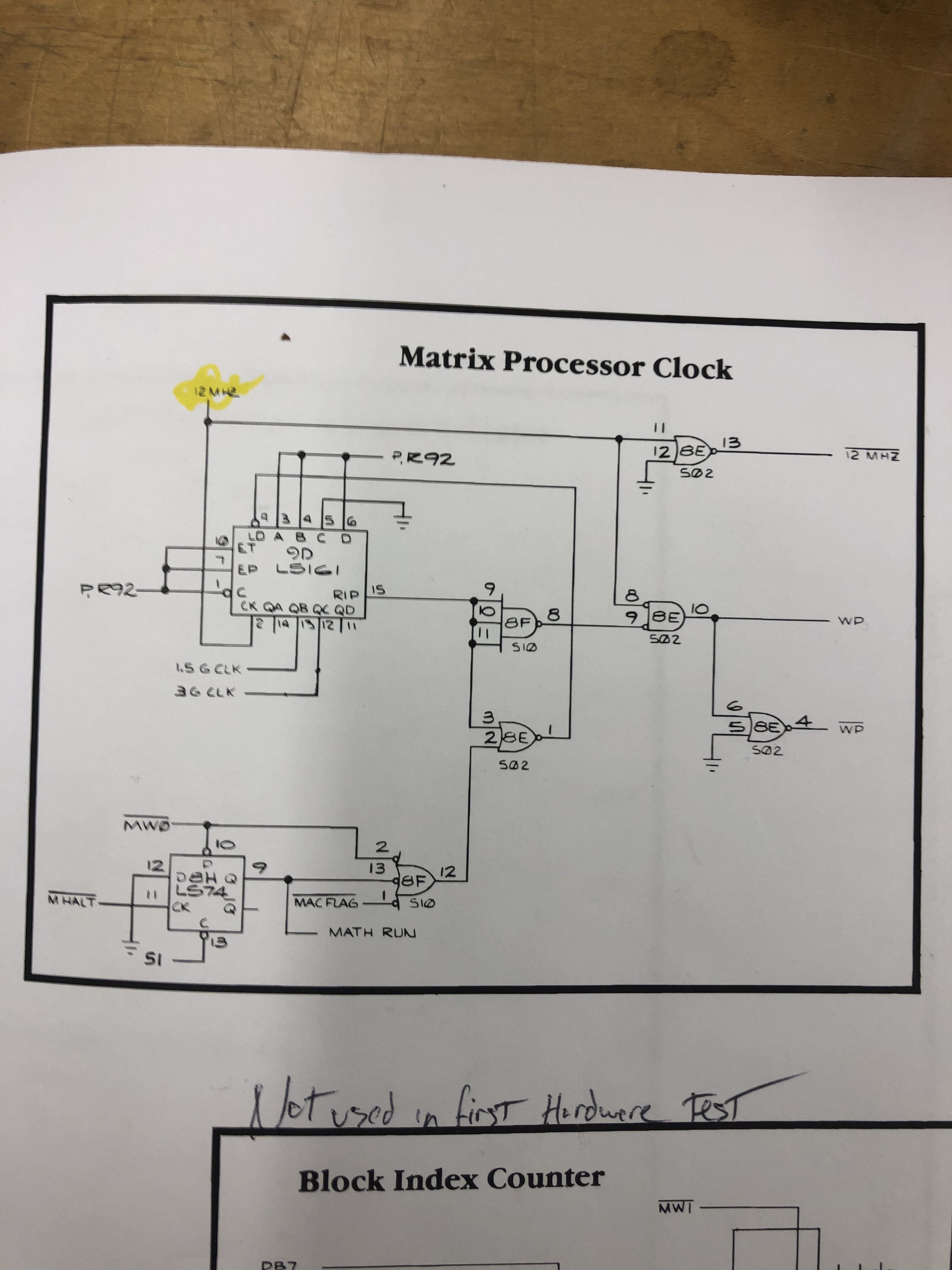
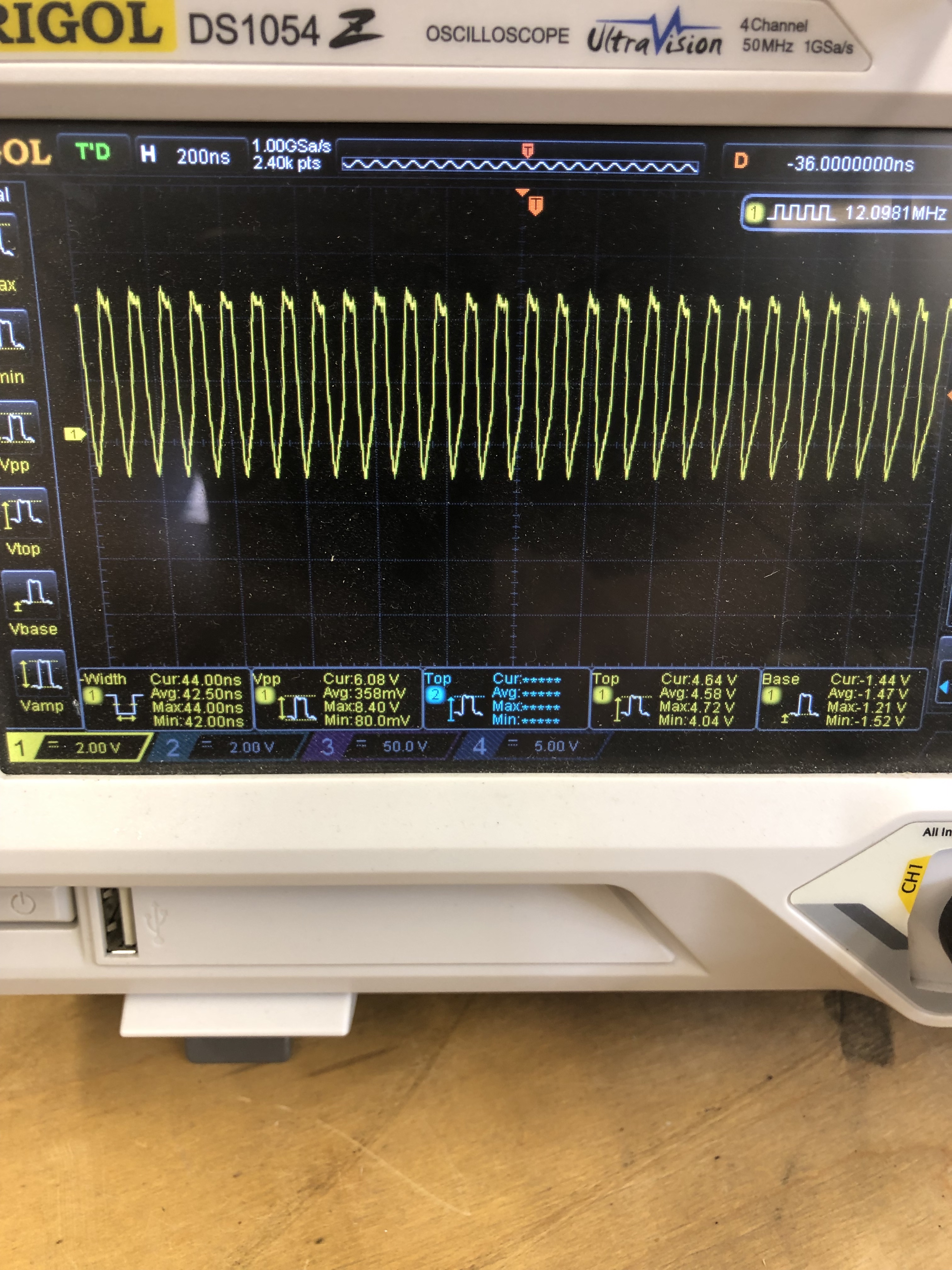
Pin2@9D – here on the scope it is overshooting pretty significantly.
More research took me to this note: Atari internal memo collection. You can read through it – the important part was:
On the boards that I received, the problem with the RAMs at 5F and 5H
were all solved by connecting a 180 Ohm 1/4 Watt 5% carbon film resistor
from 9D pin 2 to ground. There is a convenient trace on the top of the
board to attach it to.
I tried this and it worked perfectly.

I did spend some time trying to figure out how if a chip was causing this, replaced the 74S04@1N – but that did not solve the issue.
Board works!
Board #7 – Board in for repair
Initial Inspection:
- Stack has had lots and lots of prior work
- Note: None of the prior work caused any of the issues once I was done.
- Not sure if parts were shot gunned or if this stack has just had a very hard life.
- CPU Board
- Missing CPU
- Many socketed chips
- Lots of prior work
- Edge connector solder blobbed
- Jumpers on the back
- Cut traces under CPU
- AVG board
- Original AVG chip
- Edge connector solder blobbed
- Sound board
- Missing CPU
- Prior work
- Been recapped


First thing I did was remove the white jumpers on the back and repaired the traces under the CPU socket. That cleared up a RAM error missing bit5.


The two main issues (so far) are BAD MATHBOX READY LINE and the ‘partially’ corrupt graphics.
The original AVG chip was bad – replaced it.. After that, AVG board was the source of the corrupt graphics. I had inspected it pretty closely and spent a fair amount of time trying to determine the cause.. In the end.. I had plain old missed this:


The cut trace was OP1 – which makes perfect sense it was partially corrupting vectors in the vector timer circuit. I had looked there a number of times.
CPU Board – BAD MATHBOX READY LINE

Machine pin sockets all over this board. All were good as it turns out. Just having this much prior work to verify took time as I was poking through it all.
This may be the least documented issue with Star Wars stacks. More often than not (it seems) replacing the PROMs will fix the problem. Not in my case. The CPU board had a bunch of issues. All of them I corrected while trying to find the source of BAD MATHBOX READY LINE (BMRL)
While hunting for BMRL – I was able to trigger a divisor error:

This points to self test #21,23,24. All divisor tests as expected. LS374@5L (the only one not already replaced) was the issue.
I chased a few ghosts looking to the BMRL and have a better understanding of it now.
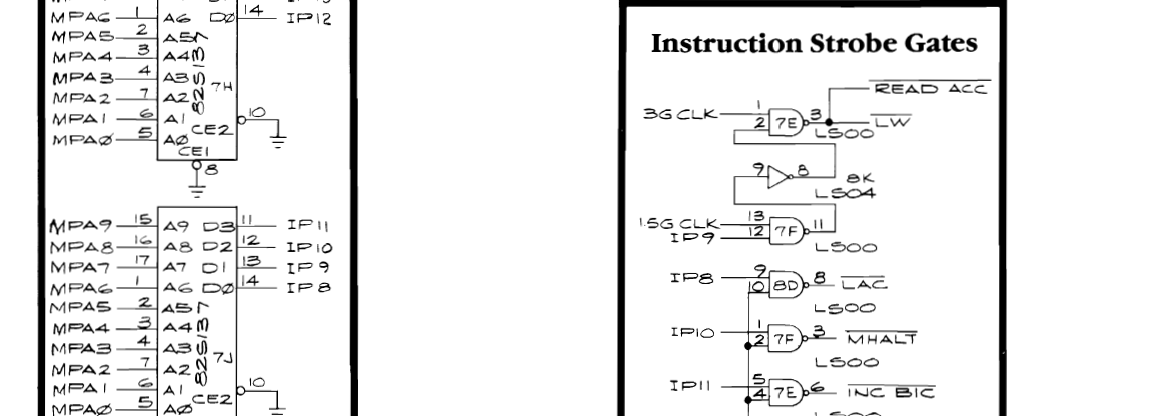
After considerable checking, testing and comparing to a known good CPU board – BMRL is a result of failed processing from the PROM@7J and specifically IP8, IP9 and IP10. Once I came up with that – I found the root cause(s).


Here is 12MHz feeding into LS00@8D before and after. The clock signal is not pulling back to zero. Removing and chip testing revealed a bad chip.. Could it be that?! No.. didn’t fix it.
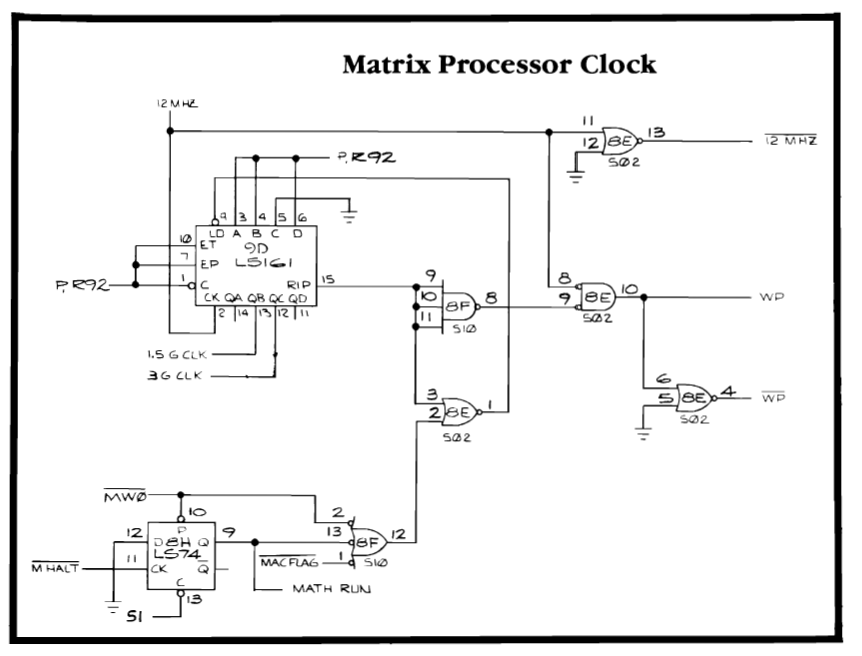
I’m certain I had previously checked the LS161@9D with my logic comparitor – and got no results. But I may have corrected something along the way. I piggybacked a new one and lifted pin12 and compared signals.. The LS161 on the board was outputting clean square waves and the piggyback one was just signaling high.. The comparitor now lit up all the output pins. Replacing the LS161@9D fixed BMRL!! Finding chips with dead pins is way easier than finding ones that are just putting out bad results.
Somewhere along the way I also found a bad LS08 and another LS00.. Which fixed something I would have seen after the BMRL was cured.
Sound Board:
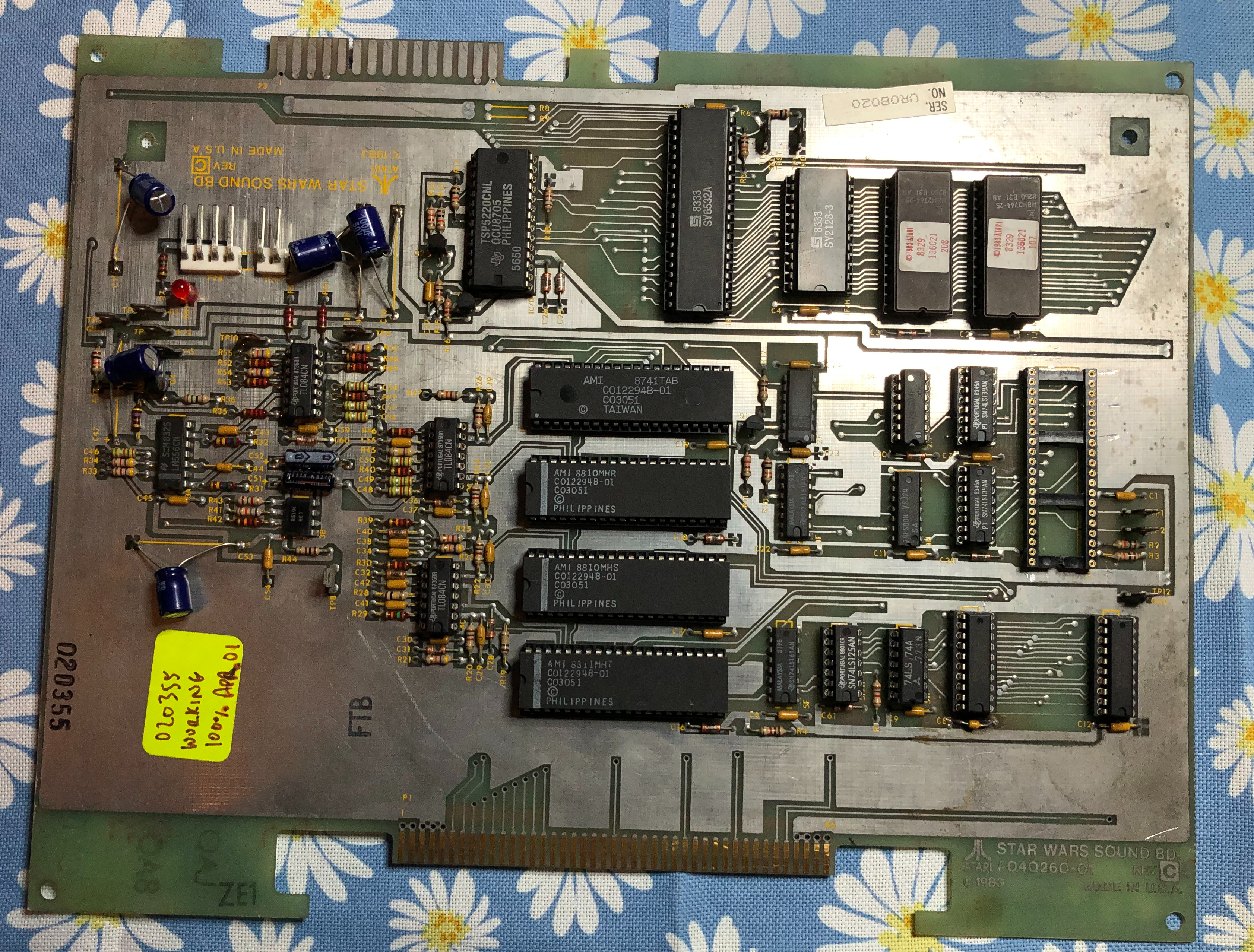
Pretty clean looking board – missing the CPU. Once I focused on it for a while it had the following issues. 3 bad pokeys (ouch) and the sounds were very faint – but I could get it to generate all of them. If I removed the TL084@3C I would get normal volume.. really? It was not the problem.

The R5106 is the issue – it is an audio chip (Reticon R5106) that adds some reverb to the sounds. This one is bad. If you jump pin 6 <-> 4 – sound is back. Unfortunately they are hard to come by – you can get one for $30+ it seems. The sound is a little flat without it..
Board works!
Board #8 – Board in for repair
Initial Inspection:
- Stack has had lots of prior work
- Missing sound cable
- Missing PCB interconnect
- CPU Board
- Surface rust on some CPU legs
- Almost no prior work
- AVG board
- Original AVG chip
- No prior work – just old looking
- Sound board
- All of the test points have solder blobs?
- Voice chip disintegrated upon removal
After initial maintenance – tested with FPGA Catbox – Only one RAM was working on the CPU board and the entire AVG board was not accessible. I found that EVMEM was not getting triggered correctly and preventing communication to the AVG board. The next part took a while to hunt down…


This is VERY zoomed in.. I couldn’t see this with my magnifier during initial inspection – A quick polish with the fiberglass pen and I could get to the AVG board. A Leakseeker for shorts is starting to look attractive.
Once the AVG board fired up – it had at least 4 bad RAM and a dead AVG chip. After replacing all of them..
The main CPU board was running better but I could not see RAM 5F5H – matrix processor address MA7 was dead @3H. Replacing the LS157@3H restored memory access to 5F5H.
Now I could get the board into test – and actually got the game up and running. Ran for about a minute – then the monitor went into shutdown.. Connected to the scope – no usable video. Probed around and determined the DAC@6A/B had died. Replaced.

Board is running – but it resets periodically. I’m going to leave it on for a day or two and see if I can finish off whatever chip is failing. I’m going to guess it is RAM since this stack already had 4 bad ones.
After letting it run another RAM failed – reset problem found. Board ran another day while debugging sound and the TL082@8B/C died.. Replaced it and overall the Main and AVG boards have been pretty solid
Sound Board:
The sound board put up a pretty good fight. I chased the right problem for the wrong reasons for a bit.. But this one had a lot going on.. The voice chip disintegrated upon removal too..

Replacing the dead parts and poking around – I could only get the board to verify it had good RAM, ROM. Parts swapping made no difference, etc. Finally I found the signal at SA12 was corrupted (looked like a short of some kind). The CPU was fine and I finally replaced the LS139@2J – it ran for about 30 seconds and reverted. There is almost nothing connected to this one.. Pushing on the SA12 line on the CPU with the scope probe made the board run.. hmm.. sockets? It was pin 20 right on the corner. Replaced CPU then ROM sockets (and RAM for completeness). No change. Flexing the board was still getting me clean signal – so definitely a bad connection. It wasn’t a short and it had to be software messing up the SA12 line at this point. Then I saw this..

Which was actually less visible than this when I found it..


This is R5 – a pullup resistor on the IRQ line that connects to the PIA which – somewhere in the software controls SA12 which was then messing up the decoding and causing no sound. Except for the self-diag sounds telling me the RAM/ROM were good. On the scope it really looked line a short.
Boards work!
*** Update ***
After a full day of burn-in, power on second day brought “Bad Mathbox Ready Line”.
Lucky it was pretty easy to find – no clock coming out of LS161@9D. Back to burn-in tests.
*** Update ***
The board that keeps on giving. After 3rd full day of power up..

Ram Replaced – board works.. again!
Board #9 – Board in for repair
Star Wars board came in. Status was board was resetting continuously. Had been sent out to two other repair guys prior to me getting it. I’d seen the resets and did a full board maintenance, cleaned chip legs, etc. This takes a couple hours
Once on the bench…


I determined the clock was bad – Original crystal 12.096 MHz. Clock running at a near perfect 3x of that. Replaced crystal. Board works. This type of failure is really due to boards not getting stressed tested enough after the initial work. My repairs include3 x 12 hours days of burn-in + an additional automated 16 cycle power on / power off test day (30 min on, 60 min off). I spread this over a 7 day period to try and shake out any other marginal components.
This board got nearly 70 hours of burn in time just to be sure.
Board works!
Board #10 – Board in for repair
Board was reported to have some bad vectors and problems with the sound. All the socketed chips get removed, cleaned, DeoxIT. Chips not tested by self-test get bench tested in a reader when possible.
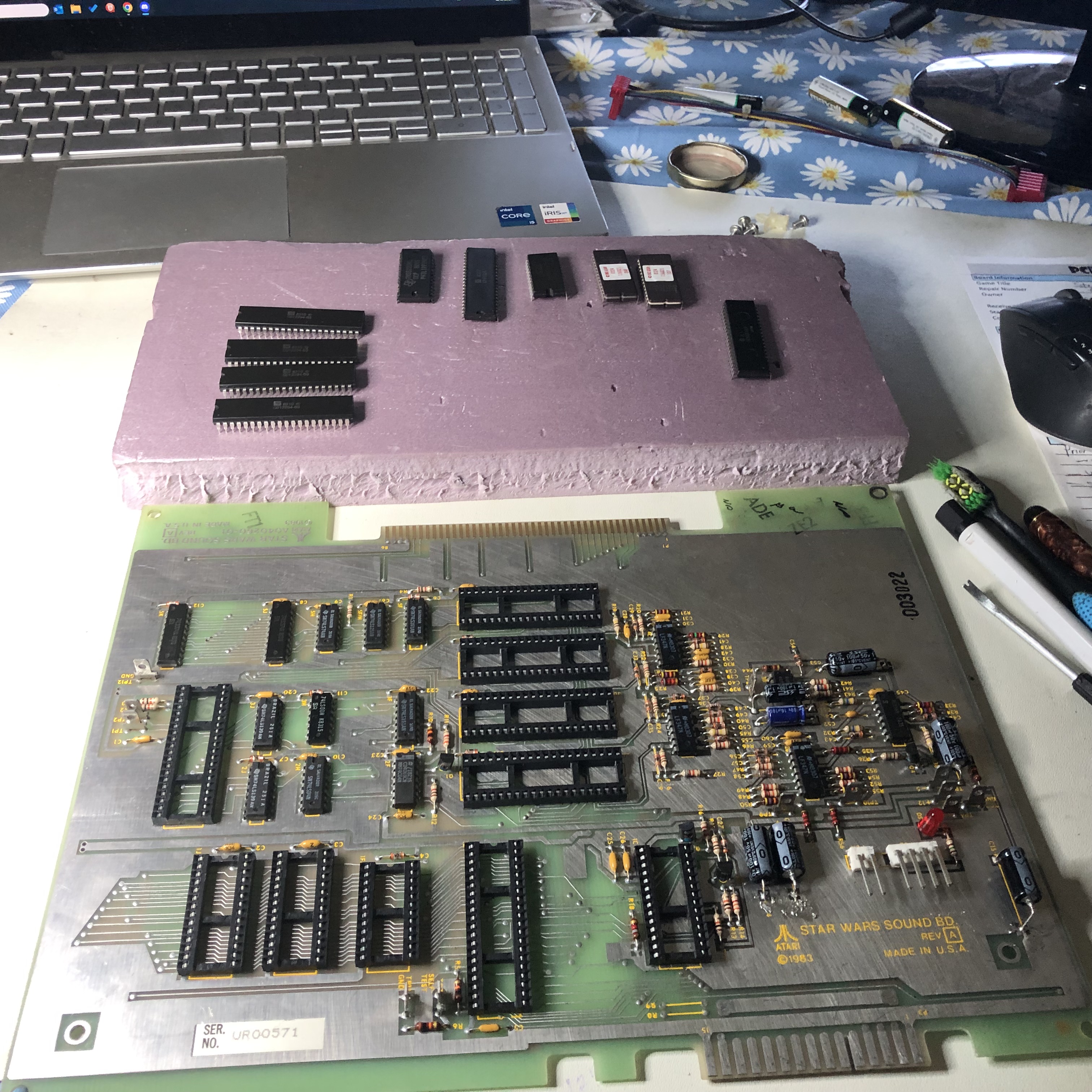
Once cleaned and inspected – this stack checked out. All RAM, ROM and vector generator tests passed. Sounds were not working correctly. There was lots of clicking and popping mixed in with the sounds, but no voice tracks.
I started simple and swapped in a good voice chip – no difference. Probing the circuit, everything looked pretty normal. There was a clock signal going into the voice chip – but it didn’t seem like it was processing data.

After probing around and seeing what looked like correct voltages on the chips as far as power goes, I checked my SW sound board and found the difference.
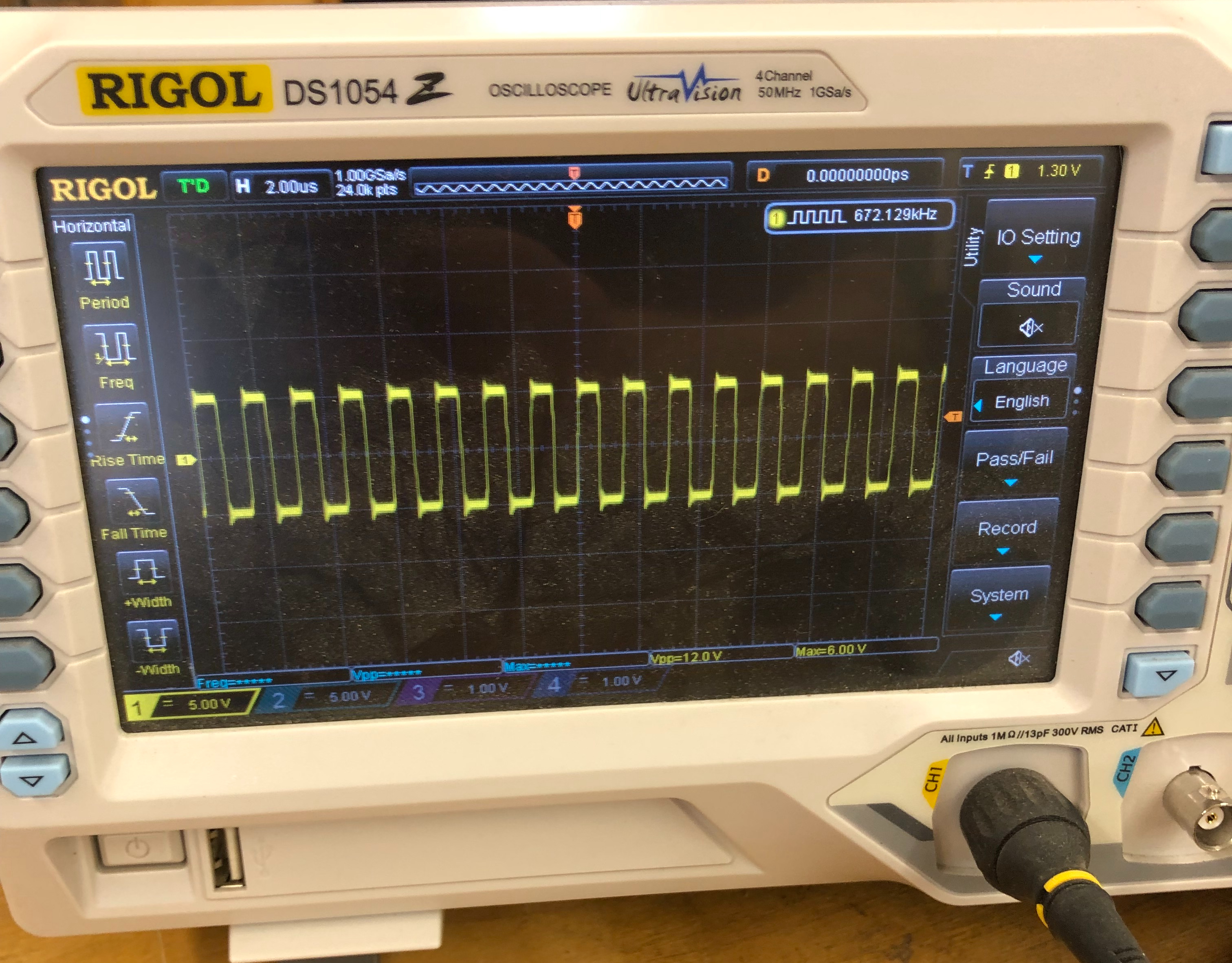
I didn’t take a picture of the ‘before’ – but the clock coming from the 74C04@2F looked like a normal square wave clock going +5v to 0v on the bad sound board. The actual clock should go +5v to -5v. Had to order the 74C04, had not run into a bad one before. Replaced it. All voice sounds restored.
Board works!
Board #11 – Board in for repair
Board was reporting to play blind. Connected it all up at the bench and no graphics as stated. Popped in a new AVG chip and game restored.
Notified the owner that I could stop here, but it is a working machine in an arcade and they chose to do the full board maintenance (chips cleaned, DeoxIT, edge connectors cleaned, 4 day test cycle, etc.)
The interesting part of this machine:


It has an original Clay Cowgill Empire Strikes Back kit. Never saw one in person.
*** Updated ***
Unfortunately this one came back – It had run for many hours.. Dead vector generator. 74LS175@4K died, so a legitimate failure. Running through many burn in cycles again before returning.
****
Board works!
Board #12 – “A New Hope”

Got these three sets to work through. There was actually one set with matching serial numbers so I shuffled them around and started with it. They were all reported to have varying degrees of issues. One was worse than the rest I was told, seems I picked that one first.
I started with just the CPU and AVG board. Setting them up and connecting them to the FPGA Catbox – there were a number of problems. Including my config file was a little messed up. After I sorted it out I had 3 bad RAM and the 6809 CPU was not only bad, it was corrupting the testing. I like to use the edge connector vs. the CPU socket with the tester. Once I removed the CPU, testing went a little cleaner.
After spending some time messing with RAM, verifying ROM and doing some vector generator testing.. I finally booted it up and ran on the scope.

The first time through I literally watched the original Atari AVG chip die right in front of my eyes. I got a bunch of game vectors, then a vertical line.. then nothing.. Popped in a replacement and got this. Game running, no fighters, no stars. Progress!
Now that the diagnostic code is running, I was able to connect to my monitor and see what was going on.

Going after the divider errors first – Looks like it is doing nothing at all. The outputs all being FFFF (except the last one?) made me look at the clock going into that circuit. Star Wars seems to have a lot of different clock generators.

Checked the LS191@8R – No output on Pin 13.. Replaced it and we now have Divider clock!

Much different data from the Divider now. It wasn’t running before, now it’s just doing bad math. The tests are #21, 22, 23, 24, 25 from the troubleshooting guide. The Divider circuit is made up of a handful of chips. When the last 4 bits of the error are F’s like this – piggybacking may be the quick answer. I poked around a bit but really – the first chip I looked at was the LS299@7M. It controlled the lower 4 bits of a shift register. Piggybacked one on and cleared the Divider errors!
Down to the Matrix errors above.. These are test#17, 18, 19, 20 – included are the A – Accumulator, B – Block index counter, C – Accumulator Adder Test, D – Subtractor Test on the right. Again the F’s in the result give me hope that a piggyback with find the bad chip. Tried out a few and the LS165@7B cleared the matrix errors. Great!

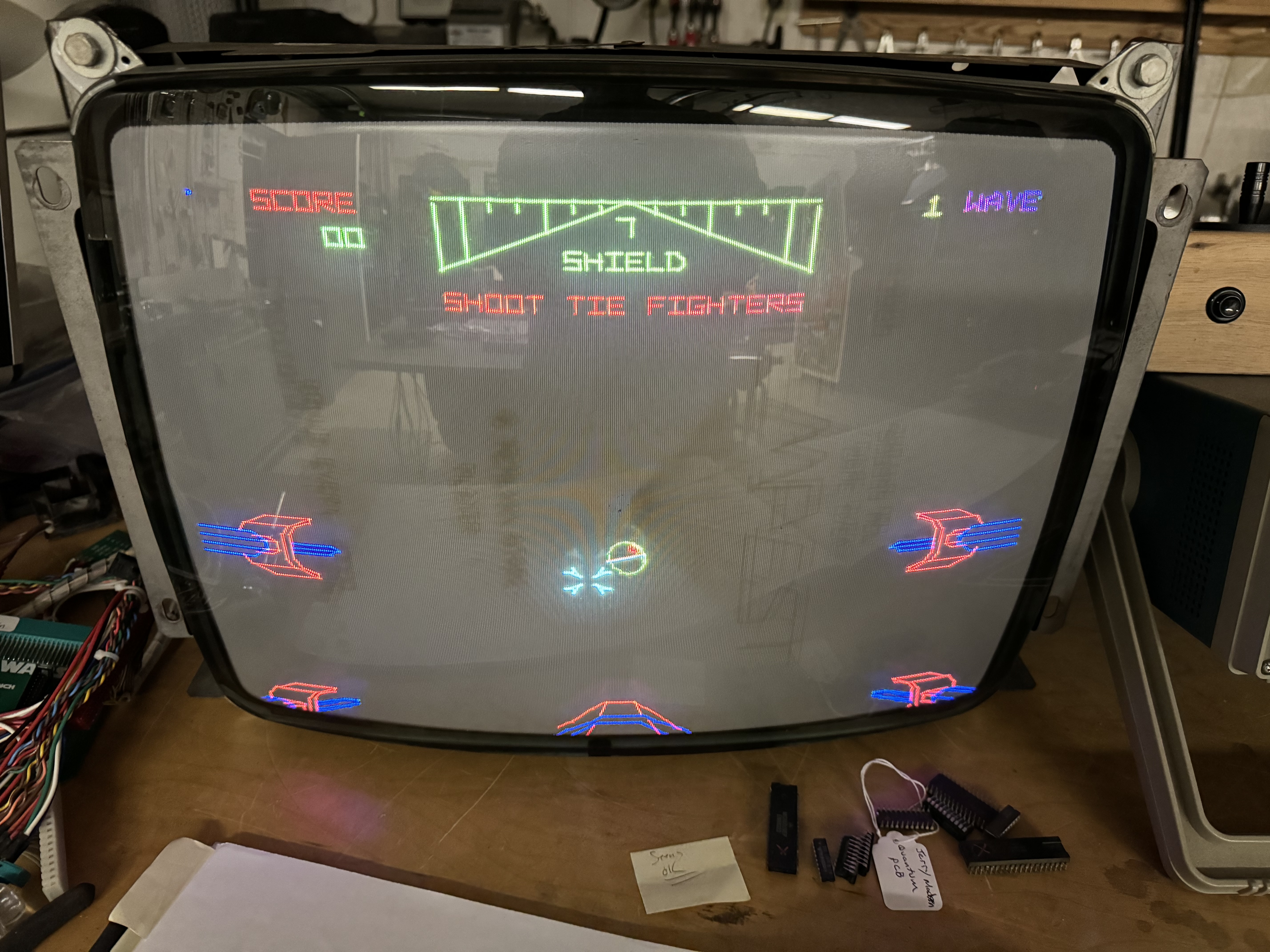
No errors. Still no stars and no ships. I chased this one around a little bit but I knew it was related to the pseudo random number generator circuit. I had not done my normal board maintenance at this point. Cleaned all the chips, Deoxit sockets, etc. I decided to move on to the sound board before tackling the stars.
Cleaning the sound board, the TI voice chip was so rusty it disintegrated. Got replaced. The CPU partially worked at first and I chased weird issues with it before I knew it was just a little dead. Thankfully it died the rest of the way and got replaced. Sound board works great now. After getting it all set up again, the stars and ships showed up. Maybe it was just dirty legs, etc? It was not to be, it ran for many hours. But it will fail and not generate the random number data occasionally.
Here is one view, the random number seems to ‘increment’ down the sides of the screen or blink in a corner. Back to the bench. I’ll note here: I chased this a little longer than I should have..
It was very inconsistent at first, some times it would fail and others it would only on a cold boot. As the board got more hours on it, it seemed to fail on cold boot more consistently. I spent more time looking at this circuit and I could trick it into restarting with a warm reset or grounding a pin on the LS299. The interesting thing was if I reset the chip by grounding pin 9, it wasn’t immediate. The stars would return at a scene change.

I probed the input signals PRNGCLR and PRNG and it appeared they were running as designed via logic comparison. The LS299@4D was the same date code as the one in the Divider circuit and made the most sense to replace. I popped in a new one, but the same issue persists.
Probed around a bit and I can almost make it happen at will now.. when it works, it works… which makes me think the LS164’s are ok? But maybe one of them is corrupting the reset signal .. I went to the beginning and replaced the LS259@9L/M that controls it all in the first place..

Seemed to work for a while, but that was not the problem child. The only control signal left is PRNG or the LS164’s. I followed the control signals around and learned more about them, they were changing frequency with the star field/background – regardless of getting stars or not.
The LS164’s in the pseudo random number generator are Fujitsu, one of them being the shiny kind which I have had lots of failures with in the past. I’m replacing one at a time. Maybe they just count when they feel like it..
After replacing the LS164@5C, I had one failure of the star field. Then I remembered something about this topic in the troubleshooting guide:

I should have started here. I’ve worked on a bunch of Star Wars sets now, but had not run into this specific issue before. Experience +1. I managed to make it fail one more time after 30-40 power cycles. I tested for white noise and it was missing (good) but got a little excited and should have tested PRNGCLR before resetting. I replaced the second LS164@5D and have not had an issue since.
***
Unfortunately this one came back – had another failure. The Tie Fighters had wobbly sides and on certain scenes the stars were ‘jittery’ – traced to a bad LS83@6N
***
Board works!
Board #13 – “The Empire Strikes Back”
I’d borrowed a few parts from this board to get the first one working. First thing was to repopulate missing chips, etc. After that I verified all the ROM and RAM good, even the vector generator was good. Maybe with reshuffling the boards I picked the two that would work?
No..
Once I verified the video on the scope I connected to my monitor:

No stars and ships again!? I quickly used my new found trick from above and determined the pseudo random number generator was working and generating white noise. That was fun.

All the tests are good except the B 0000 – Block index counter test failed.

First guess would be one of the counters failed – quite common.

However someone purposely cut the traces. Quick repair on that but the issue remained. I determined that one of the pins on the LS191 was stuck and I was going to replace it. Except whoever did this purposely solder blobbed 2 pins together on the solder side. One pair on 3E and one pair on 3D. Once I cleared them, the error cleared AND the stars and ships returned.
Turning my attention to the sound board, it didn’t work. First thing I did was check for clock – there was none AND the CPU was burning hot. Third bad CPU from this trilogy of boards. Put in a new one, still no clock. Test point #2 for CPU clock comes straight off the backplane connector – no clock.

Sound board connector has a couple of pins bent back. Small adjustment with a dental tool and we have clock and sound. Using the sound board self test – I determined 2 of the Pokeys were bad (ouch) One provides static/white noise, the other was missing a sound channel.
Board works!
Board #14 – “Return of the Jedi”
This set turned out to be pretty dingy looking. They were worse than they appear.


All three boards made a trip through the sink. A small nail brush scrub over the sockets does a nice job of cleaning up the exposed parts of the contacts.
The first two boards had borrowed parts cascading down to this one..

This is just socketed stuff from the trilogy. After repopulating with the existing and replacement parts, connected up the CPU and AVG board. RAM tested good, ROM tested good. Did I pick the two boards that only had bad socketed parts? Sorta..
Powered up on the scope – game is running!
Now the circle is complete: No stars, No ships, except for a little twinkle of falling stars now and then. You can’t make this stuff up. I quickly determined the pseudo random number generator was working with the trick above. I decided to swap in known good Instruction PROMS. One at a time. Stars returned with PROM 112. Nice…
On to the sound board. It was a complete mess.

This is the washed sound board. Voice chip was completely rotted. I had already borrowed the RAM and CPU. Had to swap in known good Pokeys for testing. Got it powered on and the voices worked pretty well, but the game sounds generated by the Pokey had a bad echo effect.
The echo was being caused by the delay circuit. Jumping pin 6 to pin 4 on R5106 confirmed that by eliminating it completely.

Checked the clock circuit to see if it was messing up the delay.
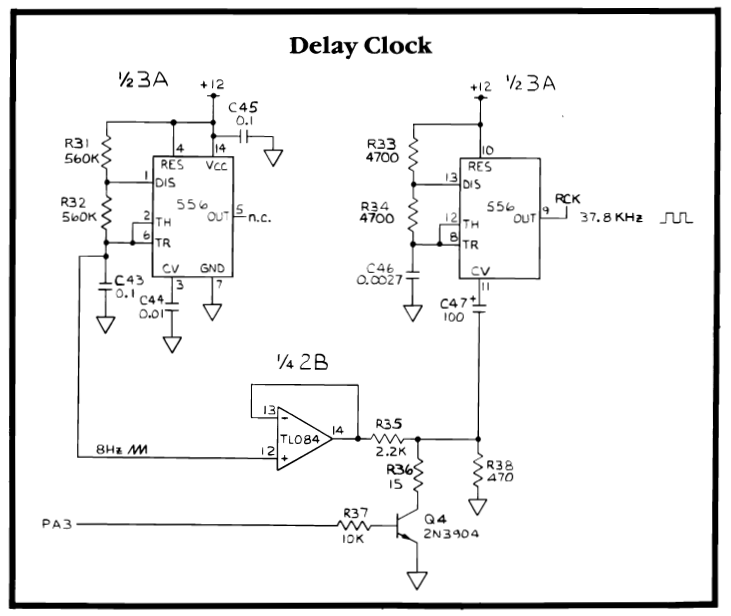
It seemed to be pretty close to my working board, but a couple of signals on the 556 chip were a little off.. Then I noticed Q4 was bent up funny (someone’s thumb at some point smashed it). Quick check showed that is was not good. Replaced it and all game sounds restored! Phew. R5106 is pretty much unobtanium had it been the issue.
Board works!
Epilogue
Even though every monitor is different, I adjust the stack to my Amplifone before I ship them when boards come in completely dead like these. Typically I use the diag screens and set XY size, linearity and BIP. No problem.
One of the stacks after adjusting came up with this image..

Adjusting to a test screen is one thing, but this is rather ugly with disconnected letters. A great way to get this really nice is to use the “freeze mode” DIP switch setting – switch8@10D. The game board is pulled out of the cage to adjust the pots at this point, so it is easy to access. Wait until you see the logo start to scroll and flip the switch to ON. The game stays perfectly still. If you hit the left trigger on the controller, you advance the screen one frame at a time. Fire away until you get the logo nice and big. Don’t walk away and have a steak dinner – but leaving the screen stationary like this for a couple minutes is no big deal. Adjusting the X and Y BIP pots allows you to line up and close the letters nearly perfectly.
Oddly enough – switching back to BIP test in diag mode looks terrible.

I prefer my letters connected and I didn’t see any ill effects elsewhere in the game. You can freeze in any scene and look!
I use freeze frame for adjusting the shooter screen too.
Many Atari games have freeze mode. I’ve used it to ‘quite down’ a PCB when I’m searching around for issues with a scope.
Finally, most of the Star Wars PCBs do not even label the pots. When they do – they are not legible.
My Cheat card:

I have it printed – I should make it a Tee-Shirt.
Board #15 – A board I picked up off KLOV as a derelict.

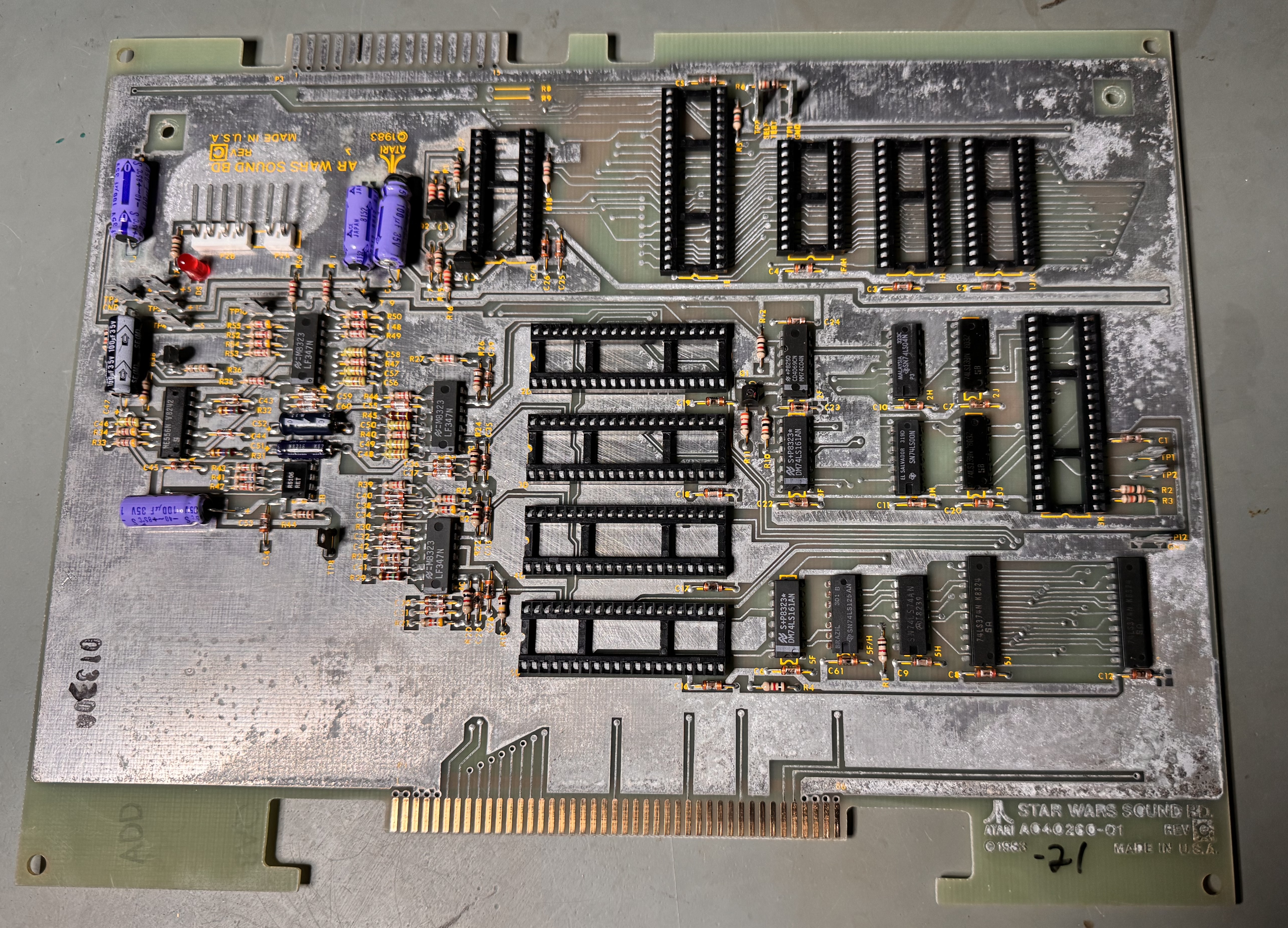

This set had surface oxidation across all three boards. I started with removing all the chips (that were there) and washed the boards. The AVG and ROM105 socket on the AVG board were missing..
After washing I went over the parts side traces with the fiberglass brush to clean up all the surfaces and make sure that there were no little shorts mixed into them.
Decided to start with the sound board. I had another Star Wars on the bench at the time. One thing I’ve seen on many Star Wars boards are these purple capacitors.


Pretty much all of them seem to leak. One of them was blown apart, but still showed it worked?!
Got all the chips plugged in and it was stone dead. To start, the CPU was not getting clock. Wiggling it effected some of the signals and the CPU socket looked terrible. I replaced it. After that it was still behaving badly. Lots of confusing signals running around the board. Finally I determined the LS139@3J was taking line select signals IN and just mirroring them OUT to all the select lines enabling all the Pokey’s at once corrupting the busses. Once replaced, I determined the 5220 voice chip was bad and corrupting the bus.


Of the four Pokeys, two had broken legs. Using a Dremel and a small round bit with a flat head, I grind out a notch and expose the top of the pin in the plastic housing. I little solder and flux and I attach a new leg. When done I put UV cured resin in the notch to help secure it in place. Both broken leg Pokeys turned out to be good! I only had one bad Pokey from the four.
Last part of the sound board was the audio was very muted. Bypassing the R5106 chip (Pin4 <-> Pin 6) fixed that. Unfortunately they are unobtanium. It adds a bit of depth to the audio – sorta simulated stereo. Jumping pin4 to pin6 restores the sound, but it sounds a bit flat.
Sound board works!
AVG Board:
First I repaired the AVG socket and ROM sockets. However this board has a lot wrong with it. I determined there was no VG clock. It traced back to LS244@1P Pin 5 – No VMEM signal which is part of the clock generator for the state machine. Replaced it and now I have clock.
Used signature analysis on the state prom@4B and there was no OP0 signal@pin1. Popped it out and determined it was bad. Using a PROM/EEPROM adapter I was able program a temporary replacement and get OP0 running, but still no halt. Continuing to look at the state machine, LS157@4A was not outputting any signals. Piggybacking a chip caused a glitch in the vector timing.. That’s good! I replaced it and restored the HALT, Great!
Next test is CENTER – however – it was not running. The only other command that seems to be running (correctly) is draw short vector. I spent some time tracking down the root cause of this issue. Based on the symptoms, it looked like the vector timers were not working correctly. Which they weren’t, but the cause was external to the actual timers. Tracing through the circuit lead to many timings that were off in the ‘circle logic’ of the VG.

OP0 on Pin 7 was the signal that was way off in pulse width as compared to a known good board and is where I focused the search. It was off due to LATCH1 pulse width timing.

Checking the State Machine one chip at a time using a comparitor showed all of the chips working correctly. Signature analysis of the prom@4B using the catbox showed it was fine. I was uncertain of the signals coming out of the BCD decoder @3D. For the first time, I used the FPGA Catbox as an old school Atari Catbox and checked the signatures coming out of LS42@3D. They were all good too. Ok – so the state machine is good AND I have better validation of it moving forward.

From here I wanted to check the signatures of the data shifters, but they were not cooperating. I could not get them to sync up on a known working board consistently using the FPGA Catbox in Atari Catbox mode. However – using the FPGA Catbox I was able to load -1’s into both X and Y and look for all the 1’s rotating through the DVxn outputs. This was the breakthrough moment because I could see all of them working on my good board AND my bad board. On the bad board, the pulses were MUCH longer.. Working backwards the ENORM pulse coming into the LS194’s was the same length as the oversized pulse of the outputs.

That lead me here, where as it turns out the input from 6J@pin10 was being sent out (inverted) on pin8. The 74S10 was performing bad logic! Replaced the 74S10@6J and the vector generator timings all came back to life!

Finally something I can see. Connected it my bench 6100 and the Z axis was locked on, retrace lines everywhere.

Found this quickly. No outputs on LS164@8N. Replaced and vectors being drawn without retrace lines. AVG board works!
*** Spoke too soon ***
It wasn’t noticeable on the scope and I didn’t really catch it on the bench 6100 – but on the Amplifone it was very visible. The Linearity test had a bit of a studder, but the letter scrolling is very stair steppy..
Didn’t take long to find. The LS273@5E was putting out bad data on pin 5. Replaced it.. Smooth scrolling now!
AVG board works!
CPU board:
Once I got it connected up and populated, the RAM and ROM checked out. The vector generator board was not working when I first powered up this board. I popped a known working AVG board and the CPU board is mostly running! Diagnostics come up and I get “BAD MATHBOX READY LINE”. C21, C73 were broken.
I started by checking the Matrix Processor Clock area and it seemed to be ok, but not doing anything.


In the past I’d had trouble with the Multiplier/Accumulator Clock and happened to check the output on LS161@9C – it seemed to be a floating pin12. My HP logic comparator also showed a bad pin12 (and pin14). I pulled and tested it and it showed bad, but it did not solve the problem. However, it did activate LS161@10C and now that it was getting signal from 9C@pin12, it didn’t seem to be counting correctly. A quick piggyback and the READY LINE error went away and my new errors showed up. Progress!

One thing on this board, I had a prior repair and ‘borrowed’ the AM74LS384 (AM25LS14APC) chips since I didn’t have any in inventory – turns out both on this board were bad, so they had been replaced prior to starting this section.
From here decided to work on the matrix errors first.

It took a little hunting, but the LS165@6B was the issue here. I missed taking a few notes and I don’t remember exactly what it was doing.. What’s nice about this particular diag screen is that it runs continuously. Piggybacking chips or probing with a grounded test lead and grounding suspected chips narrows the search by changing the display output.
On to the divider outputs. All 0000’s is a pretty strong clue that no output is being generated.

Piggybacking a LS299@7D caused the divider errors to glitch and show outputs. Replacing the chip got me here.

This is a step forward! Probing through the divisor circuit, I found that the LS83@6N had dead outputs.. These are not to be found it seems, luckily Centipede has them and I was able to ‘borrow’ a couple. I did fix an issue, but still no differences.

Continuing, I piggybacked the LS374@5L and got half the answer.

High order bits on the ERROR seem to be good. It also changed some of the low order bit errors on the last two rows.

I started testing the other LS83@6M also had some dead outputs. Notice the low order bit ERRORs have changed. 40FF-> 407F, etc.
Here is where it went off the rails, somehow a tiny solder splash happened on the the parts side, but it had me chasing ghosts for a while corrupting the MATH BOX data bus. Once I got past that nonsense – replacing another LS374@5M cleared the remaining divisor errors.
Board works!
Board #16 – Board in for Repair
Received this one in from an operator friend to go over. It was reported to have a main CPU board issue, messed up vectors and a sound board that was resetting.

Board came in with known 3 bad RAM, the AVG Chip, ROM 105 and the voice chip were missing. First thing I did was connect up to the tester and started verifying ROM and RAM in place. I also noticed some of the fingers on the backplane/interconnect were oddly bent. I corrected them with a dental tool.
After replacing all of the known missing and bad components, there were RAM errors. I spent some time cleaning up the parts side traces and found a short causing the RAM error.

This was tiny – but killed some of the RAM signals nicely..
On to the AVG board – it had the bad RAM. Star Wars is very sensitive to RAM speed and getting them moved around so that the PCB was happy takes a little experience.

C4 was broken in the X part of the analog section. The tiny little cap causes linearity distortion when missing. Easy fix on that.
Sound board: Voice chip was missing – got replaced. Under test, all of the generated sounds were good – no voices. I’ve run into this before..

The 74C04N@2F (CD4069CN) has been a failure point I’ve bumped into before. It’s output is the clock for the speech chip. Voices restored.
The last issue took many hours of hunting and burn in time to finally uncover.
While watching the game on the scope, these vectors appeared..
Some of the Star vectors were going way off the playfield on the left and right side. This was definitely a chip doing bad math. The self tests were not catching it. At first it seemed thermal as it would go away after a few minutes. I tried to find this a bunch of ways – nothing was jumping out. I decided to force the issue and left the board running overnight, then during the day. Then I created an automation for a smart outlet that turned it on for 10 minutes and off for 10 minutes – 60 times. What came of all that was it did slowly get worse AND the symptoms became more noticeable.
The towers glitch during the sequence – this was new and it was relatively consistent.
In the end I was able to narrow it down to a chip I’ve never had fail. It was also difficult to acquire, not readily available.

The 74LS384 (AM25LS14APC on every Star Wars I’ve ever worked on..) was the cause of the graphics issues. A little on-line research showed that it was involved in these sorts of math calculations.
Board works!
Board #17 – Board in for Repair
Reported symptoms: Board runs DIAG screens normally, watchdogs when set to game mode.
Performed all normal board maintenance, removed chips, Deoxit legs, etc..
- Ran board self test – everything checked good
- Ran CATBOX RAM, ROM checks – everything checked good
- Checked RAM on the bench with the Inquisitor – RAM checked good
Looked for other issues, however, replaced RAM@2F/H.
RAM was not viable at game clock speeds..
** Update **
During the burn in testing, the game graphics developed a glitch. Stretchy tie fighters. I had not noticed it a first while making the video..
Back on the bench… worked on it a bit more. The self tests do not pick up on those sorts of errors, they are a little more tricky to hunt down.. Finally found a bad LS83.
Board works!
Star Wars #18 – board in for repair
Got a repair from a work colleague – the reported issue was “The game runs slow”. The boarded needed to be cleaned and I did all the standard clean the board, chips, Deoxit, etc.
Connected up the board on the bench (without the sound board) and everything worked as expected. Connected up the sound board and the sound test was off. Determined there was a bad Pokey crashing the board. (not sure which position, they got mixed up during testing).
Going back and testing, the crashing of the sound board DID cause the game play to run 20-30% slower (an approximation – no real way to measure). I went back and forth a few times with the bad Pokey to confirm.. The crashing must have disrupted a handshake between the boards enough to slow things down.
Replaced Pokey
Board works!
Star Wars #19 – 4 boards in for repair
Friend of mine had 3 Star Wars sets he picked up 15 years ago.. A friend of his had a set that had started watchdogging. Big box of Star Wars showed up..
This set had a Star Wars Empire Strikes Back kit installed, I de-converted it to test. Hard to see here..

The CPU socket had a loose pin. Replacing the socket and cleaning up the surface traces with a fiberglass pen resolved the issues.

Board works!
Star Wars #20 – repair 2 of 4
This set had a number of issues

However – they all start the same way. Remove chips, clean legs, Deoxit… These were pretty clean, but I washed the boards since 2 of the sets will eventually be sold.


Some highlights from this set.. I’ve never seen these purple caps on the sound board not leak. The record stands.. Replaced them. During testing, there was memory corruption.. A few swipes with the fiberglass pen on the surface side and cleared up. Finally the edge connector is some odd replica version – it doesn’t fit into the cage correctly and more importantly, it doesn’t work. I checked for shorts and everything seems fine.. but the boards will not run with it.. It has an extra row of holes for a 4th connector – which makes no sense either..
Other items from this set: State PROM was missing and the AVG chip was no good. On the sound board the 6809 processor was dead. Ran the full 3 day test cycle.

Board works!
Star Wars #21 – repair 3 of 4
Third board of the Star Wars set. This one was reported the controls were stuck up in the corner.

This Analog to Digital converter@9K was the issue, replaced. The voice chip on the sound board disintegrated upon removal (common with these silver leg chips), replaced.
All other maintenance completed
Board works!
Star Wars #22 – repair 4 of 4
This one did not boot – did all board maintenance – board works!
Star Wars #23 – Board in for repair/rebuild


Stack was sent in from an operator I’ve done repair work for in the past. He told me up front that it was missing a lot of chips. These pics above are how it came to me. Lot’s of missing chips..
- 2 x 68B09’s
- 8 x EPROMS
- 1 x RAM
- 4 x MATH PROM
- 1 x 2212 NVRAM
- 2 x Analog Switches
It needed more parts than I had in inventory – but I wanted to get started. I end up pulling nearly all of the same chips from my reference board when I work on stacks with Empire Strikes Back kits. I have to remove the ESB kits to baseline the stack for repairs. So I pulled all of them and populated this stack after washing, inspection, DeoxIT, etc.
During the cleanup and inspection. The DIP switches @10D disintegrated as did the Voice chip from the sound board. The sound chip socket needed to be replaced as a result of the bad chip.
Once into the repairs – the data bus was messed up across the board. Took a while to track it down..

The signal on MDB10 was bad, but it straddled the data bus and the MATHBOX ram. Once replaced – everything came to life!
Board works!
Star Wars #24 – Board in for repair

Got this from a local collector. I happened to be at his place and this guy was watchdogging. I’ve now seen three different Empire Strikes Back kits – Clay Cowgill’s, Vector Lab’s and now Mark Spaeth’s. I removed all of it and repopulated with Star Wars ROMS, etc..
This set had 2 issues beyond not working.


A burned up pin on the edge connector – not common on Star Wars, repaired it. It also had this odd jumper @2K. At first I thought it may have been related to the ESB kit since I could not find directions for it.. But it was not. The leg was cut and jumped to the the exact same place it went to in the first place. I removed it and repaired the leg back into the PCB.
Once I got to troubleshooting, RAM and ROM tests showed no access the the AVG board. I looked at signals on the AVG board and determined the data signals were either missing or distorted. After seeing bad inputs to the board – I went back to the CPU board and checked there…

The LS245@0D/E connects the data bus from the CPU board to the AVG board.
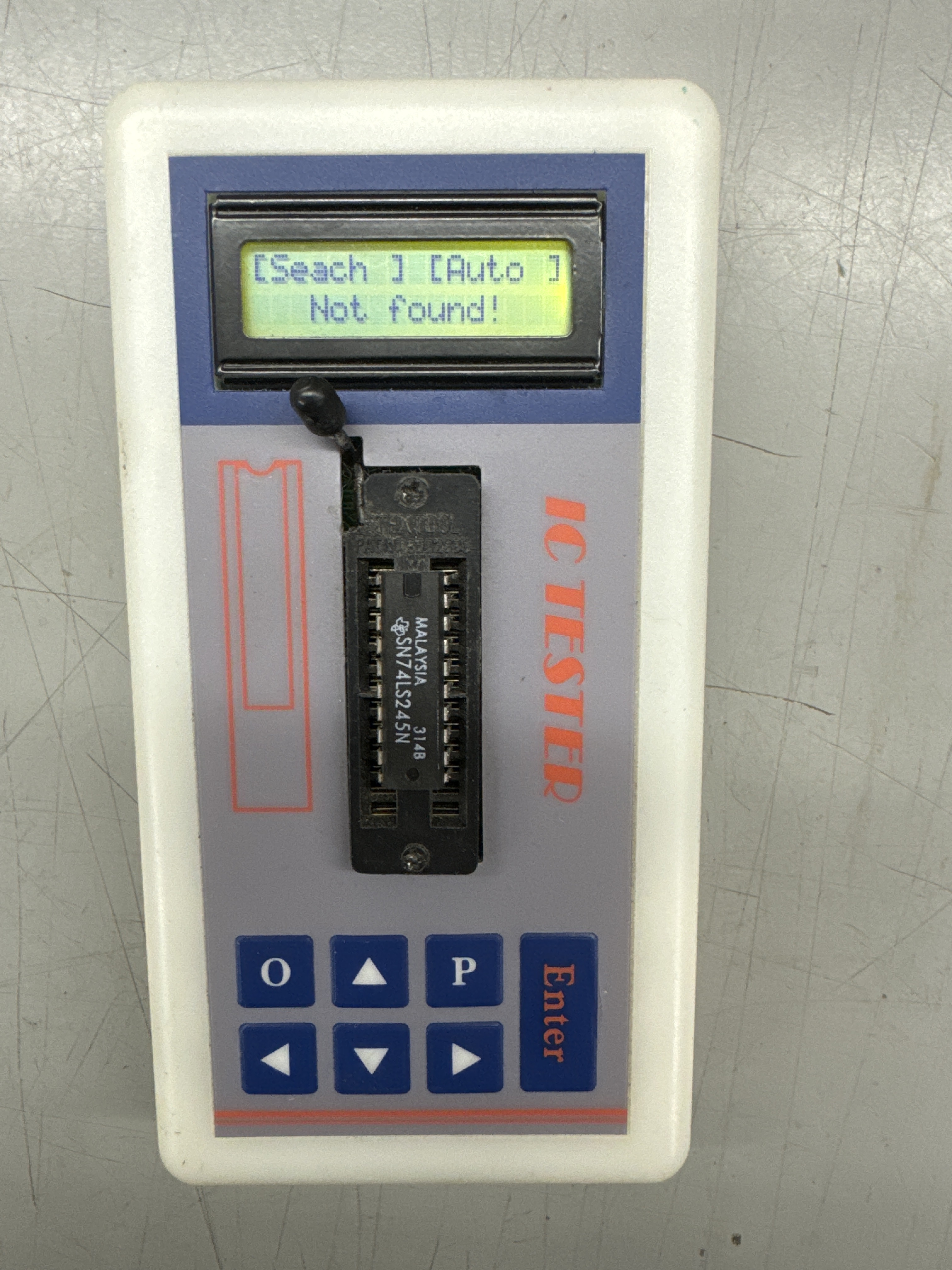
A Texas Instruments chip that failed – not common.

All three boards running on the bench with my interconnect.
On day 3 of my burn-in cycle – Tie Fighters when getting shot were very distorted. Test mode revealed B0000 matrix error. Traced to a bad LS191@3E
Boards work!
Board #25 – Board in for repair
A forum member on KLOV had purchased a Star Wars reproduction PCB set, picked up all the parts and assembled it.. Unfortunately it didn’t work. He worked on it and worked with a friend to try to get it working.. Then asked me if I would look at it.
Many would not take this on.. Working through a board set that is 100% prior work can be problematic. I figured I’d give it a shot .. but no guarantees.

At first glance, boards look nice. My initial impression was.. every single chip is socketed, not my first choice. I personally would have socketed RAM, ROM, CPU and chips in the analog section. Pretty much I would use sockets as Atari did on the original Star Wars set. I would not have socketed standard TTL chips. That said..

ALL of these off-brand chips used on this board set didn’t work as expected. But….they would have been much more difficult to find and replace if everything had not been socketed. I consider sockets a failure point most of the time. If I were building a repro board for myself, I would still solder the TTLs to the board after checking them. Someone who is ‘giving it a shot?’ and hasn’t built a PCB from scratch before? Maybe sockets are the way to go. This is a good topic of debate – I’m still a little torn on it after completing this repair.
Initial Triage
Everything looked pretty good at first glance, all of the work seemed neat. Resistor colors lined up. etc.. I had not done a very close inspection at this point. More on this to come….
CPU Board: Had a few signs of life. I tested by using my good AVG board and was able to check local RAM, ROM. It was unable to access the AVG board as far as I could tell.
AVG Board: Essentially stone dead. Connected to my good CPU board, I could not access RAM, ROM or see any signs of life.
Sound Board: Works great! I did find a spot where a cap was not installed. I’ll let the owner put it in. I don’t have matching caps and it really is a clean looking board.
Since the CPU board had some signs of life, I decided to start with it and tested paired with my AVG board.
CPU Board first:
First thing I went after was the CPU board wasn’t communicating with the AVG board.
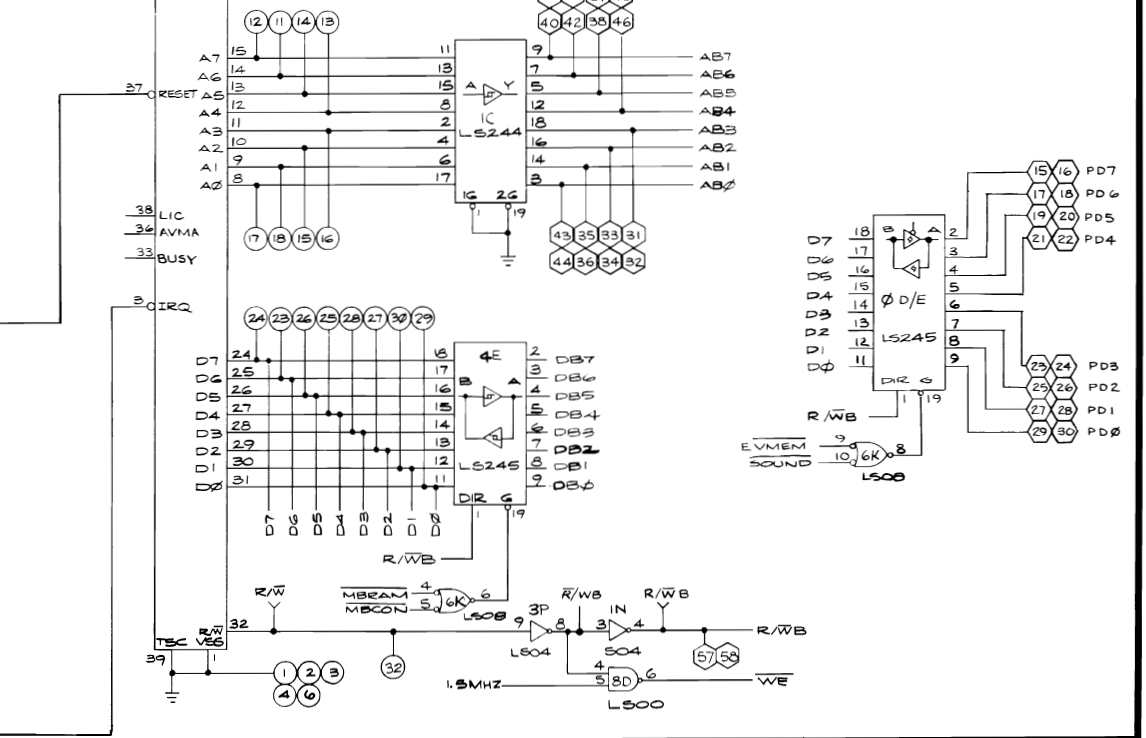
No RAM or ROM visibility to the AVG board, I started at the LS245@0D/E. Replaced with a new Texas Instruments 74LS245 and the matching one on the AVG board @1K. I could now read RAM/ROM! Not so bad, first thing I tried worked!
Which brought me to this..


Many of the off-brand chips read different than they are labeled. The last one is a TL082 – Reads as a LM358? These were definitely not usable in the Star Wars stack. What I did find is they work sometimes. Depending on where the chip is in the PCB design, they sometimes work and sometimes don’t.. None of the replaced chips read as 74LSxx – the TTLs read as 74HCxx. That said, there are still some of these off-brand chips on the board because they work in the circuit that that are in..
I found a good article describing the difference: The Ultimate Guide to 74ls vs. 74hc series ICs. These chips should be sold as 74HCxx in my opinion.
Once I had the CPU board communicating to the AVG board reading RAM and ROM I focused on getting the state machine working. The Vector Generator had odd timings, but the VG clock was messed up.

The 74LS161@2N was reading as a 74HC161. Replaced it and the clock was restored to the VG on my AVG board. This clock is on the CPU board. It also got the vector generator running to the point where I could connect the monitor and I got Mathbox errors. Replaced more LS161’s and the Mathbox clock was restored and the errors cleared.
A pattern was starting to emerge and I started pulling any of the chips that read 74HCxx and put in TI chips to see where what would work and what didn’t.

At this point I was able to get the CPU board working with my AVG board and the game seemed to be running correctly(ish) on the bench. There were more issues on the CPU board as it turns out, but I did not know the extent of them at this point.
AVG Board:
I connected the repro AVG board to the repro CPU board. I was able to read RAM, ROM. The VG was dead. It took a while to determine where things were breaking down. HALT was not running correctly. I’d continued popping out the off brand chips and popping in the TI’s. But they were not really effecting the VG. Sometimes I would get a blip of HALT, sometimes not..
Eventually it lead me to this..


The ground pin on the state prom was never soldered in place. Correcting this got the state machine cooperating a little, but the timings were off on most of the tests.. It was around now where I determined the soldering work was a bit inconsistent. There were a number of cold joints


Here were some very dry solder joints or on the right just incomplete cold joints. Overall – my recommendation would be to use a lighted magnifier lamp and solder with a little more flux in it. The joints on this board were more likely to have too little solder vs. too much. So, add just a bit more solder AND hold the iron on just a bit longer to get it flowing.. All the work was clean, it just need more solder and more time with the iron.

Access to the AVG board seemed to cut in and out on occasion.
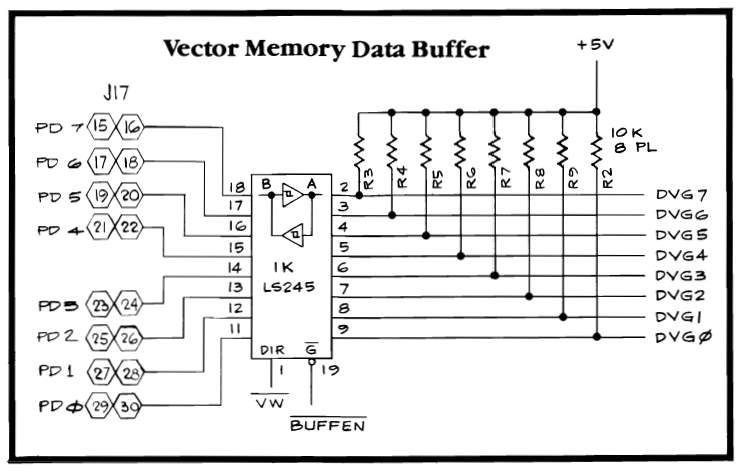
Reflowing all the pins @1K resolved that issue – so a new thing to look for – even seemingly good looking joints needed to be reflowed potentially. In one area of the board I could flex it and create and fix issues. More pin reflows. I eventually went over all 3 boards looking for dry solder joints and reflowed them. It just took a while to determine that it needed to be done. Eventually I replaced enough chips and reflowed enough sockets to get the VG running and graphics on the scope, progress!
First thing I saw were terrible curly lines on the scope.. Replaced all the off brand TL082’s with TI chips – corrected that. It felt safe to connect it to a monitor. Here is what I got after the TL082s

I’m pretty sure this is Klingon – sorry wrong franchise – The 74LS273@5E was involved with this. It was off brand.
There were easily 20+ issues I had to correct on this stack.. I stopped writing them all down because they were all inter-twined and it was hard to keep track.
A couple of big ones that were really tricky. Once the VG was running and I was getting a clean picture – some items were still off. Running through the self tests, the LINEAR SCALING test would size the box down 50% but it didn’t complete. It just stopped and immediately skipped to the LINEAR AND BINARY SCALING test. That one is where the box shrinks to 50% of its size, then pauses, shrinks 50%, pauses.. ~8 times. On the test – it would alternate, shrink – then skip down a size, then shrink, skip a size. This all seemed like a digital issue since it was the box shrinking and it seemed like the BINARY SCALING may not have been working? I did a fair amount of testing and even set the SCALE bit with the CATBOX and determined it all looked right as far as I could tell. After a lot of testing I determined my issue was inside this DAC Reference circuit and not a digital input to it. However it was not the LS273 or the DAC-08 since I swapped in known good ones.
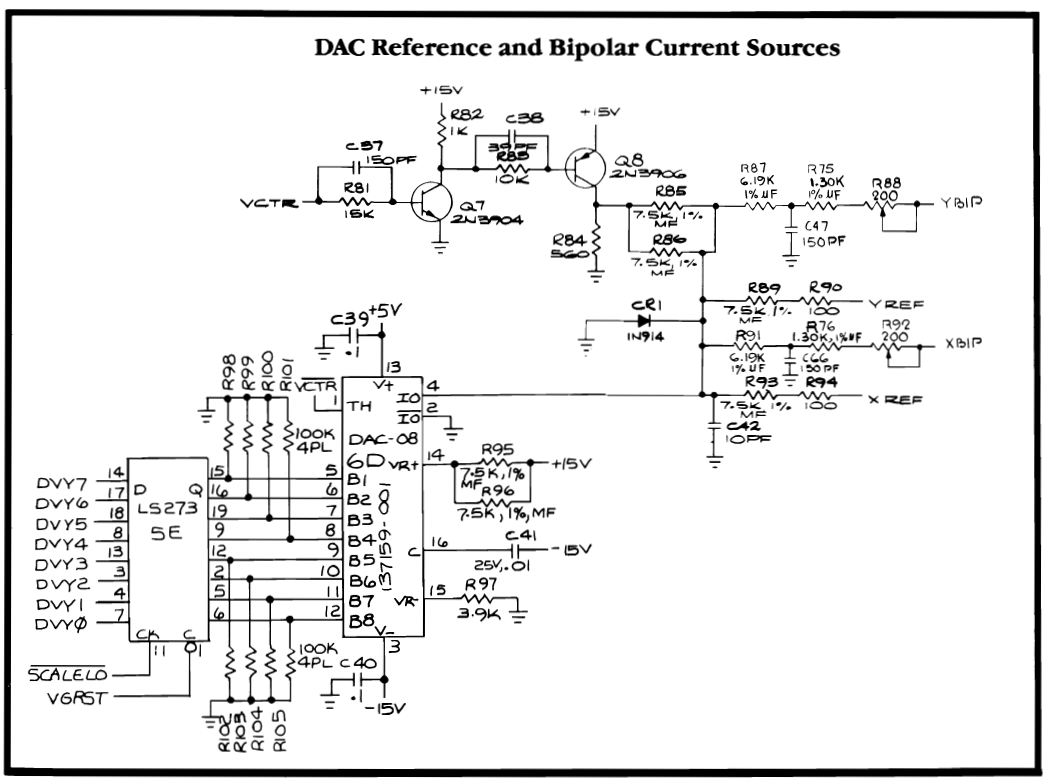
I checked the voltages and they were all good into the DAC (it seemed) But they were not.. I reflowed the cap @C41 and it fixed everything! WTF? The tricky part is it reads 0V on the chip side, not -15V under normal conditions. It is also weird that the scaling jumped? Not sure.. I ended up reflowing this entire circuit. During all of this while I was connecting, disconnecting, soldering, etc. I would flex a board, twist it, bow it, hit it.. Just to see if I could tease out any more soldering issues. As I did, I’d reflow and continue. At one point the star field would appear and then go away, I reflowed the sockets in the pseudo random number generator circuit. The boards have been very solid and have not need any additional reflow the last few rounds of physical testing.
Final major issue..
This one started out as a real head scratcher – up to this point it all seemed good and the boards had stabilized. It took a few tries but I realized the vector generator was failing at the exact same point. It failed when the Easter egg ‘MAY THE FORCE BE WITH YOU’ is first rendered completely and isn’t a set of dots.
I’d seen a similar issue on Battlezone once were a specific situation happened and the VG died. It turned out to be a bad ROM that tested good on the bench and tested good in self test. Just didn’t want to run at game speed. I ended up sleeping on this one a bit and woke up with an idea..
Let’s verify what is happening in freeze mode! Here I find the exact frame of the game where it doesn’t cooperate. Things are happening pretty slow as you can see.
I tried swapping the ROM, I even swapped the RAM. I was thinking it was an addressing issue for a particular part of the ROM at first – but that didn’t seem right. Then I figured it was some sort of muxing issue. But I decided on the nuclear option..
First I 100% verified the issue was on the AVG board, I could recreate it with my known good CPU board. It was on the AVG board for sure.

I then went through all the chips that I considered off brand/not TI and swapped them out and retested. I did this early in the circuit because it is clearly an issue with getting the vector code into the vector ram and executing it cleanly. After a few different chip families, I pulled a couple of 74LS32’s. They tested as 74HC32, but had been working fine (it seemed).. In the end, the LS32@2E – seen here is used in three places. It was the root cause of the graphics issue. I repopulated all the others one family at a time and no more glitches. If I were to guess, it was LS32@pin11. It clocks the LS74@2D Decoder Disable- signal ST3 goes directly in to the AVG chip and that is where the Easter egg gets selected for rendering. At least this is how I envision it..
Final thought
If all of the off brand chips were not socketed, I’m not sure I would have figured this one out. Or at minimum – pulling every single one and replacing it with a TI chip would have been a massive undertaking. If I were building a repro board for myself, I would still not use sockets on the everyday TTL chips – but I would check every single one with a tester before putting it in the board.
Board works!
Board #26 – Board in for repair
Received a board in from a collector who got a good real on an upright. After having worked on it, this board has clearly not been powered on in 20+ years..

This one started as they all do – I remove all the chips, inspect the board for issues, clean chip legs, Deoxit and reinstall. In the summer, they often go to Maine with me on a weekend and get cleaned in the AM with coffee and YouTube.
Once I got back to the shop – I connected into the CATBOX and started running diagnostics. Right out of the gate it was acting funny. The ROM@1F and the AVG ROM would not read even though everything looked right. I tried the vector generator tests and had zero timings.. Took a step back – CPU was stuck in reset. Not watchdogging, just reset.
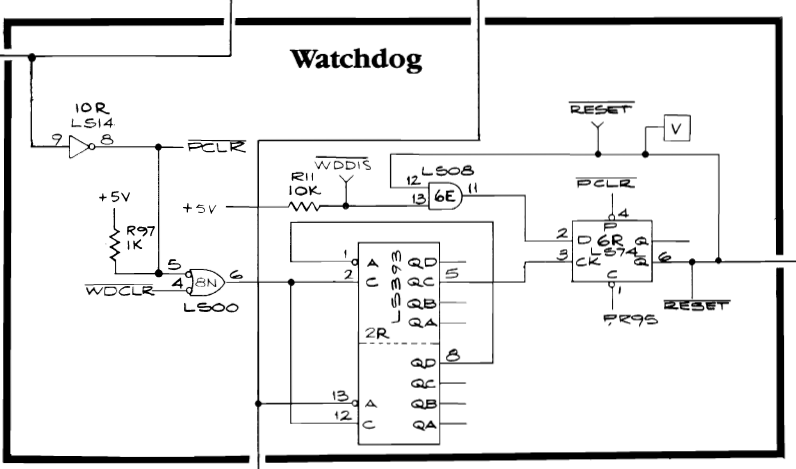
Determined the LS393@2R was not working correctly causing the LS74@6R to hold the RESET line low. Replaced it and now I could access RAM and ROM. I also started getting vector timings. The RESET line also kills the VG circuit. Good future clue. Timings were all messed up. The board had the original Atari AVG chip – it was bad. Replacing the AVG chip restored the vector generator.
Things were looking pretty good – I could read all the RAM, ROM and generate vectors. Took a few hours to resolve of this and a couple of co-mingled issues on this stack. Switching the board into DIAG mode, I could get the first Whop Whop Whop memory test screen, then the second screen that shows DIP switches and tests the buttons and controller.. Go to the third screen and the board crashed and rebooted. That was a new one.. Disabling the watchdog helped here. After a bit if messing around I was able to semi-stabilize the board and get to here:

I generally like seeing ‘FFFF’s in the results as they are generally bad chip outputs and can be sniffed out with a piggyback here and there to see who is causing the issues. This board set had a LOT of issues..
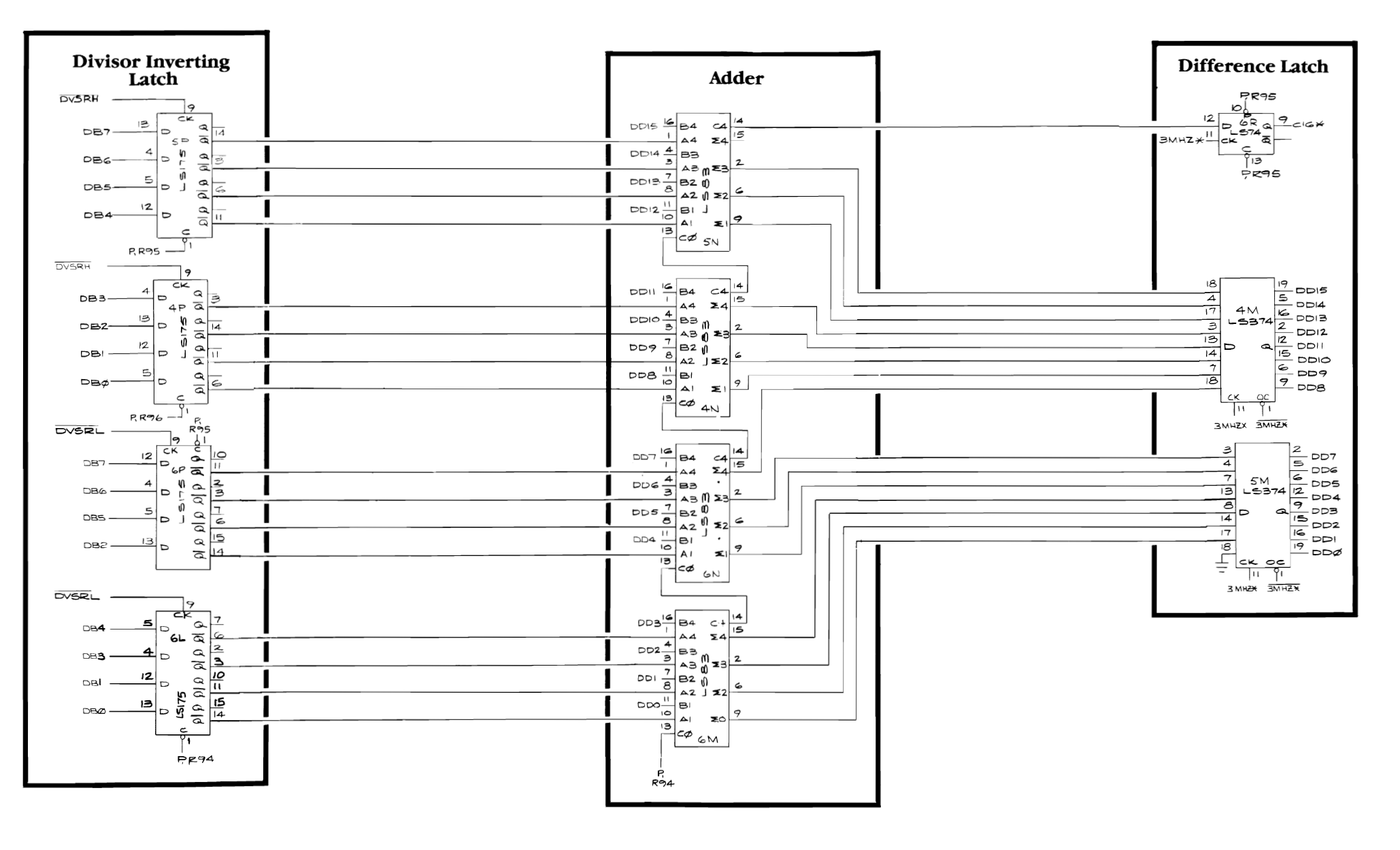
I started checking inputs/outputs and clocks in the divisor circuit and they seemed to be fine. I piggyback on LS373@4M eliminated the center line of the test above (test 23 in the troubleshooting guide)

LS299@3N did something interesting, it changed all the numbers and brought back the test 23 line that had failed earlier.. My strategy on this is pull and test the offending chip, if it’s bad in my tester – replace it.. This LS299 was bad.

During the on/off power cycling while testing – the dreaded ‘BAD MATHBOX READY LINE’ error popped in.. It’s getting worse! The clock generator LS191@8R died.. replaced it so I could get back to Divider errors.

Further testing and cross checking – LS374@4M and LS83@4N cleared out 2 error lines in the diag screen. Mixed in here was an LS175@4P. I lost track of the order of error clearing at this point. I did pull and put back the LS299@7M – It gave a false positive. The final chip that cleared the last of the Divider errors was the LS374@5M. Finally! I chased this in circles for a while. All Mathbox tests were good at this point. All DIAG screens were good. RAM good, ROM good, VG good.
Switch to game mode – stone dead… Nothing..
Star Wars can run all of the diagnostics without the interrupt circuit working. In normal game mode – interrupts need to work.

There is a lot going on there – but part of the issue with the interrupt timer was LS393@2P – same date code as the LS393@2R that killed the reset circuit.


Frequency out of the bad one ~6kHZ.. Should be ~3kHZ. Now that it was running at the correct speed – STILL no interrupts getting to the CPU to allow the game code to run.. IRQCLR LS74@2M was pinned low…

Cause: LS138@8M – Pin12 stuck… Replaced it and the game RUNS! Finally..
Did some testing on the Sound board.. The R5106 chip was bad.. bypassed for now.

This stack surprisingly made it through all 3 test cycle days without a chip failure. My final checklist before I box it up and ship it includes testing the NVRAM and DIP switches (among many other tests) The x2212 NVRAM was bad and one of the DIP switch banks had 2 bad switches.
Board works!
Board #27 – Board in for repair
Received a SW set that was reported non working and needed the Vector Labs ESB kit installed. It took a weird route to me via a couple of repair places..
First up I did full board clean and maintenance. Tested with FPGA Tester – all was good. Set up the board to test.. dead. Bad CPU. Replaced the CPU and the board worked. hmm.. Put on ESB kit and had issues with the Z axis. Game shows up fine on the scope, but not on the monitor (at times).

This one has a pincushion correction board – I had not seen one in person. But works nicely.
All of the sockets associated with the ESB kit were really sloppy, probably from the game being shuffled around a lot. I replace them and so far there hasn’t been any Z-axis issues. I’m going to do more testing to be sure. But so far..
Board works!
Board #28 – Board in for repair
This set was originally part of a warehouse haul. After cleaning and initial testing – it was in pretty good shape. Needed a total of 3 RAMs replaced.


As with all purple caps on SW sets – these were leaky and got replaced. The two black pots X/Y linearity were all chewed up and nearly unusable. They got replaced. The AVG chip was also missing. A little cleanup and testing.
*** Update ***
On the 3rd day of testing, the X-wings developed a vector glitch where some of the points of the X-wing were stretched out. The hard part was it only happened in the first minute of powerup.. Freeze spray was not locating this chip.. It was not showing up in self tests either since it was working enough it seems. Eventually found the issue with a LS299.
Board works!
Board #29 – Board in for repair
Board reported not running. After full chip cleaning & inspection, board was completely locked up.
Connecting to the FPGA Tester showed every other ROM was being selected.

Looking at address decoding – the line at AB13 was pinned low.. Since it is the’1′ – it explains the issue of every other ROM not being accessed.

Directly connected to the CPU is A13 which goes into an AND gate@2K to create AB13. Clearly the LS08 is being used to drive AB13 so that it can be used on other boards in the stack. The CPU cannot drive it directly. Here A13 was running as expected. P-R94 was not.. This should be a simple 5v+ on a 1k pullup resistor supplying 5v or a ‘1’ to the gate. Using a probe w/5v+ forced the voltage onto LS08@2K pin 10 and made the board boot. Problem defined..
Solution: Very tricky to locate root cause….
Pullup resistor R94 is used by the following 10 chips!
- 74LS08@2K – Pin 10
- 74LS138@8M – Pin 6
- 74LS138@8L – Pin 6
- 74LS138@2L – Pin 6
- 74LS83@6M – Pin 13
- 74LS175@6L – Pin 1
- 74LS164@5K – Pin 1
- 74LS164@5J – Pin 1
- 74LS153@6F – Pin4, 10, 11, 12, 13
- 74LS299@7M – Pin 11
One of these chips was dragging the 5v line down.. There are a number of approaches. Brute force is to snip each of the 14 legs of these chips one at a time to determine which one is the cause..
Looking for a ‘hot’ chip is a better starting spot.. I let the board run for an hour and then used a laser thermometer and picked the ‘hottest’ chip first. The board was powered on and connected to the scope so I could see instant results. Of all 10 – the LS175@6L was the warmest at 97 degrees.. I snipped pin1 and and board sprang to life?! First try?! Replaced it and the board has been 100% solid ever since. It would not have been my first choice since it was a TI chip which are generally very reliable and there were plenty of Signetics and Fujitus in the group.
It may have been a bit lucky.. I tested the new chip after an hour and it was running near the same temperature, it may just be working hard.. It also shows that I really need to buy a FLIR at some point.. Finding a hotspot will be simpler.
All other board maintenance completed.
Board works!
Board #30 – Board in for repair
Board sent in with reported resetting and bad graphics. Boards that were recently powered I usually plug directly into the test rig before doing maintenance. If they were old operator hauls with an unknown background – I usually do the board maintenance first to eliminate dirty chips and look for physical issues.
All that said – this one had the original Atari AVG chip. I replaced it with a new on and the board started running.. I let the owner know and was going to just send it back..
However – I decided to do a quick test in my cabinet and then found the sound was messed up.. Jumped the gun.. Back on the bench the sound board would reboot and fail for 30-60 seconds. A reset or toggle to diag and back would generally clear it.. This means a chip has a thermal failure. I’d swapped out the socketed chips with my reference board and there were no changes. Sound board was resetting.. During this I had pulled one of the ROMs and then reseated it (a couple times) and found the resetting became a lot less random and got consistent in it’s duration.
This made me do board maintenance, cleaning chip legs, Deoxit, etc.. Once done – I narrowed the cause the the 68B09 CPU which was corrupting SA3 (sound address bus bit3) until it warmed up. Took a while to find because it self cleared and I had to power down, wait for the chip to cool, then retest to verify that the CPU was the cause.


Here is SA3 cold… then after about a minute warmed up.. Replaced CPU, sound board fixed.


I completed board maintenance on the CPU and AVG board following this since dirty chip legs were contributing to the overall issues initially.
During my final checklist – where I make sure everything works (coin counters, controls, etc..).. I also test DIP switches on SW stacks.. Both banks had bad switches. Had to replace both blocks.
Board works!
Board #31 – Board in for repair
I received 2 sets of Star Wars boards from a pinball repair shop. These have been sitting on a shelf for a long time. They generally have a failure from when they were put on a shelf, and then just from sitting for years – some of the chips fail.

Continuing the streak – purple caps on a SW sound board always leak.. Replaced all 5 of them.
This stack was really dirty and I’m certain they are to be sold. They got washed and inspected.
Once all the board maintenance was complete, I connected to the tester and the RAM and ROM were good. Ran the vector generator and the graphics on the scope were a mess. Didn’t notice it at first but the small mylar .01 cap@C4 had broken off. Fixed the analog display issue.

Once I could display on a monitor, the diagnostics were visible. Most of the tests worked – but the matrix math section of the board did not. When I see 0’s like this – it is usually a dead chip. After some poking around – the PROM#112 was bad. Replacing it restored all graphics.
Last was the sound board – I’d replaced all the leaky caps. Sounds worked, but the speech was just clicking. I went back and forth on this one swapping in a new voice chip (turns out I got a handful of bad ones..) – the CD4069 chip was bad and restored the voices. Original voice chip was good!
Board works!
Board #32 – Board in for repair
Like the prior set – this one got washed and cleaned.
After full board maintenance – I need to replace missing parts.
- Original AVG chip on the video board was missing. Got a modern replacement. –
- PROM#112 was needed – got one from my inventory.
- x2212 EEPROM was missing for storing settings and high scores. It got replaced.
- Sound board wiring harness was missing – made a new one.
The TMS5220 voice chip had a single broken leg. The others were solid – so I repaired the one leg. Many times this chip tarnishes and all the legs rot off…
After all of the board maintenance and cleaning and component replacement, powered up the board and it ran (for a while).
Initial testing showed that there was no sound.
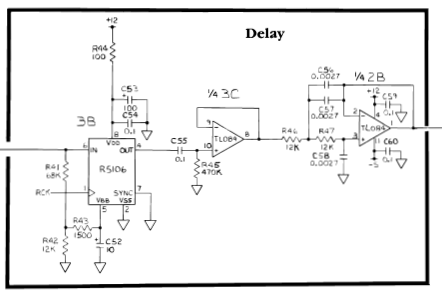
When this happens – the first thing I check is the R5106. It is a ‘simulated stereo’ chip that adds depth to the sound. When it dies – no sound. You can test by jumping pin 4-6. It was dead. Unfortunately these are unobtanium.. except… I managed to get a few at some point so I was able to restore the proper sound. You can bypass – but the sound is really flat.
After the first full night of burn in – The DAC @6A/B died. Replaced it and completed my 3 days of testing. When I went to play test and run my final checklist..
Here is the tower wave. If you watch.. the towers keep leaning further and further to the left and eventually the screen wants to flip. I wasn’t really sure where I was going to look for this one..
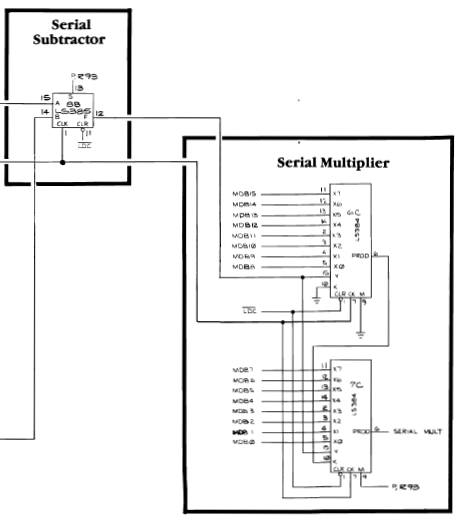
In the past I’ve had odd vector graphics issues caused by these hard to come by chips (LS385 and LS384) on SW they are actually AM25LS15 and AM25LS14’s. I probed these and they did not seem to be a contributing factor. They can partially fail and not show up in the self diagnostics. After looking closer at the board…

Here are the matrix processor RAM @5H, 5F – just to be sure I swapped out the RCA branded RAM. Problem solved! The tower coordinates must be stored at the end of the RAM address space since the rest of the game runs correctly. RAM was not my first thought in this failure. Bad matrix RAM usually scrambles the vectors much more.
For the record – Star Wars really prefers these SY2128-3’s as the matrix RAM. Whenever I need to replace other RAM on the board – I move the SY2128’s to this location. So I guess I should have tried this sooner.
Board works!
Board #33 – Board in for repair
Owner reported no voices in the sound circuit.

The CD4069@2F was bad which supplies the clock signal to the speech chip. Also broken was Q3. It had a broken .. but touching leg.. Which you see now and then. The speech would also cut in and out flexing the board a bit. Both of these restored reliable sounds.
I would have stopped here – but the customer wanted the full board maintenance and burn in testing.

Cleaning chip legs.. Not glamourous.. But it seems to make a long term difference.
Board works!
Board #34 – Board in for repair
Send it with sound issues. The audio track was off – but the sound tests all sounded normal (at first)
Playing the game – it sounded normal.. except the background music on most parts normally has a little beat to it. etc..
Listening to the built in diag.. I missed it the first couple of times through… The very first tones in the sequence test each Pokey.. The 3rd Pokey test tones were missing. Swapped in a new one – no difference. Probed around and using the scope I touched the enable line and it squealed.. hmm. Finally looking REALLY close …


I saw this smudge.. Cleaned with a fiberglass brush and the enable trace was cut.. repaired the trace and the sound is restored.. I’ve worked on a lot of Star Wars.. Didn’t realize Pokey#3 had no sounds in the sound test except the very first test (which is easy to miss..). Kudos to the owner – the missing sounds most people would not have caught.. you have to really know the game to miss it..
Sounds work!
Board #35 – CPU Board only in for repair
Board sent in by a repair shop with a specific ask to fix matrix errors on the CPU board. They had done some initial diagnostics and could not clear this last issue.
Found bad 74LS299 and replaced to clear the issues.
Board works!
Board #36 – Boards in for repair
Reported symptoms – no video.. True!
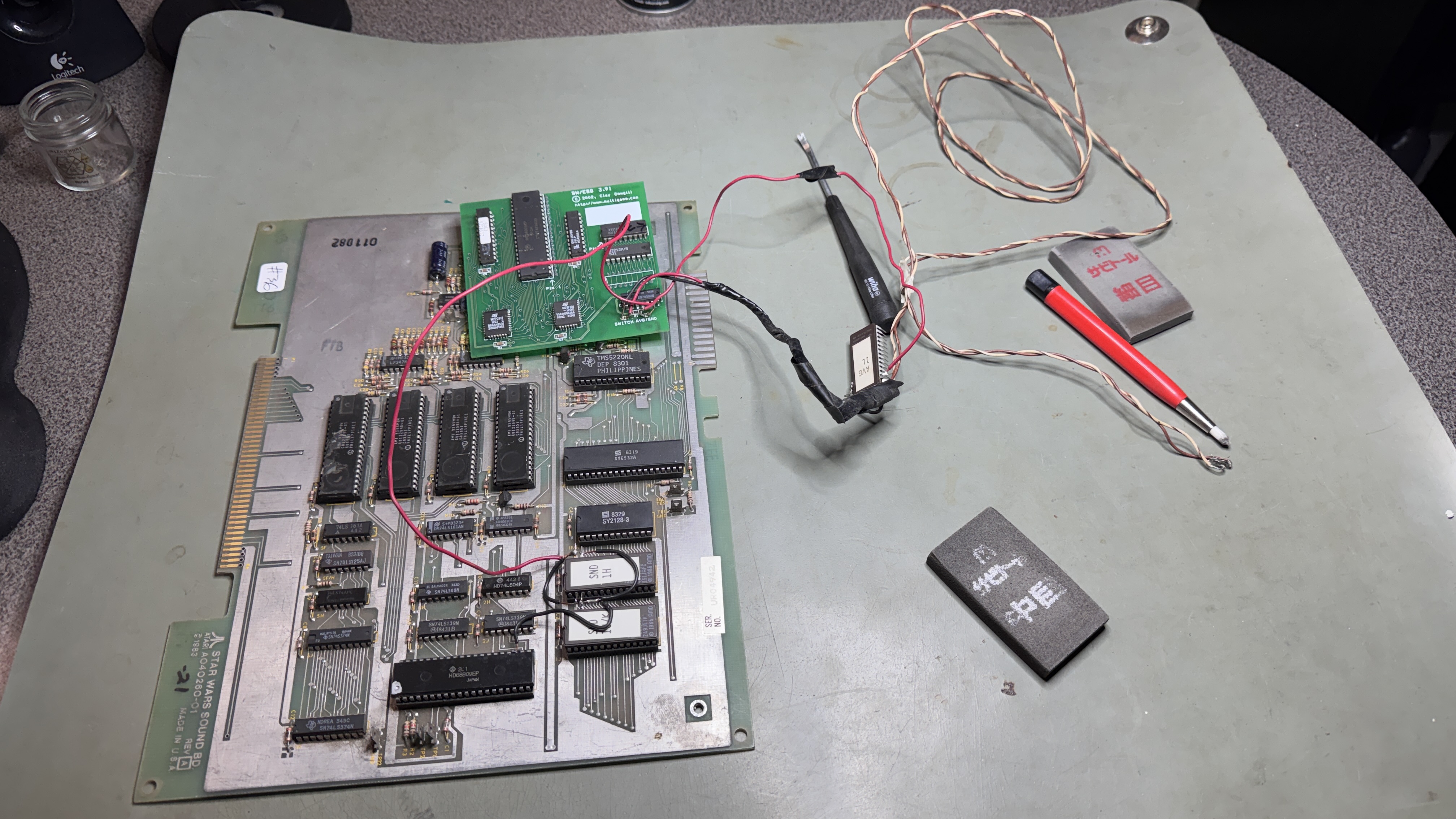
This one had the Clay Cowgill Empire Strikes Back kit. Not my favorite kit… Works great – but has a lot of difficult to reverse mods. One is cutting a leg on the LS08@2N. It’s usually cut on the board or a trace is cut. But I remove the kit to test memory, ROM and the vector generator. I had to pull the one that was there, add a socket and they use a good chip to test. The upside is going forward the cut leg chip can be popped in/out easily. Once RAM/ROM were good – I popped in an AVG chip and determined it was the root cause.
After that – owner wanted the board maintenance. It needed it.. There were a couple missing screws and metal lets on the end connector. I restored everything to ‘normal’. Did full 3 day testing cycle.
Board works!
 Lakeside Arcade
[…] the Atari repro boards that was built up.. This is my second repro board repair, my first was this Star Wars set that needed a LOT of work to get running. This particular board ran, but the text during the […]